

Built for construction & manpower companies

Run your entire workforce
in one place.

From site check-in to payroll — Manpower OS gives every construction company its own private workspace to manage people, projects and compliance.

  • 30 days of full Pro, no card
  • Never charged automatically
  • Your own private subdomain
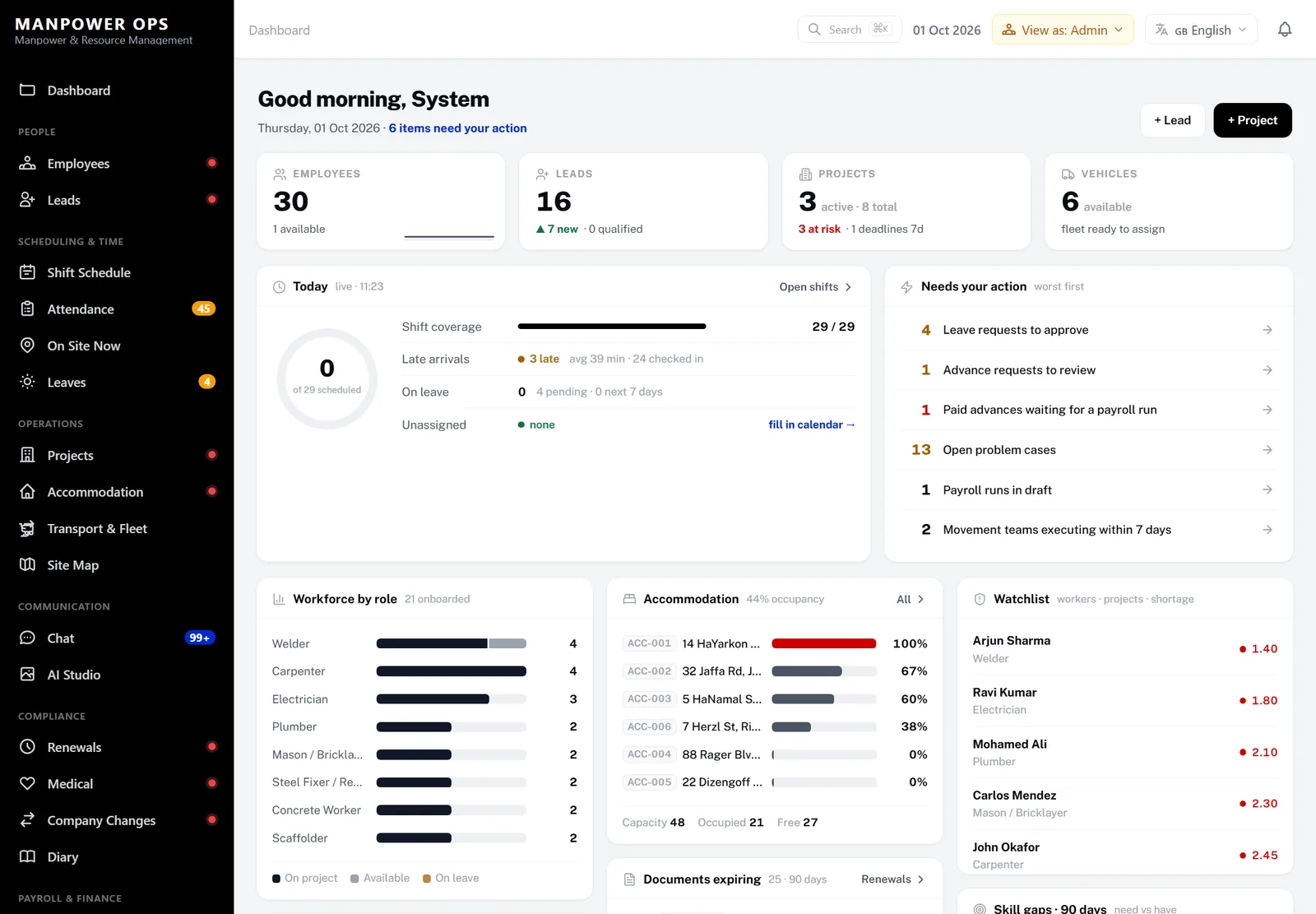
Manpower OS admin dashboard: today’s shift coverage, late arrivals, items needing action and workforce by role
29/29 shifts filledShift coverage · today
Check-in 07:33 · on siteGPS checked · selfie on file
Leave approvedCover assigned · Fri 02 Oct
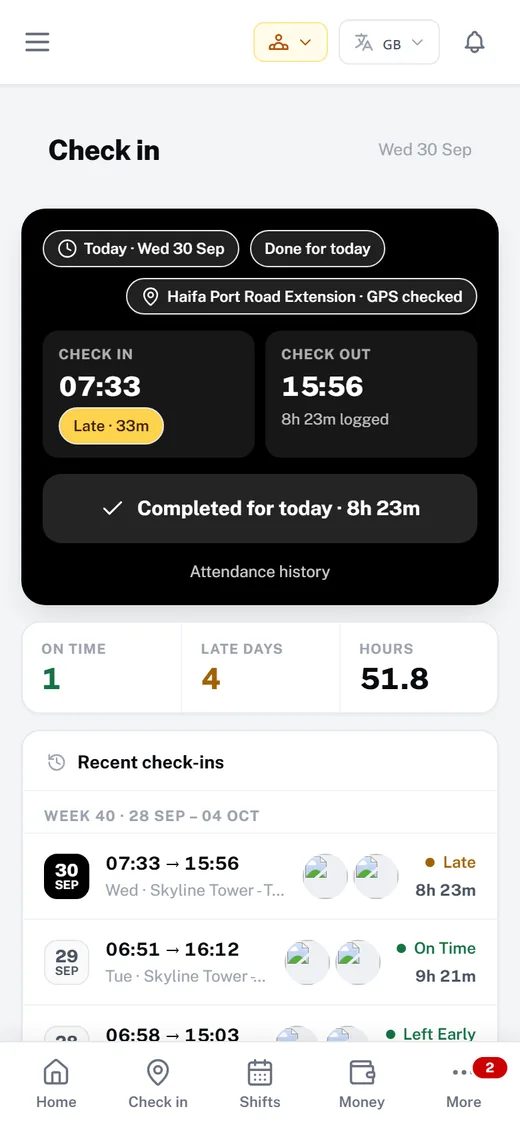
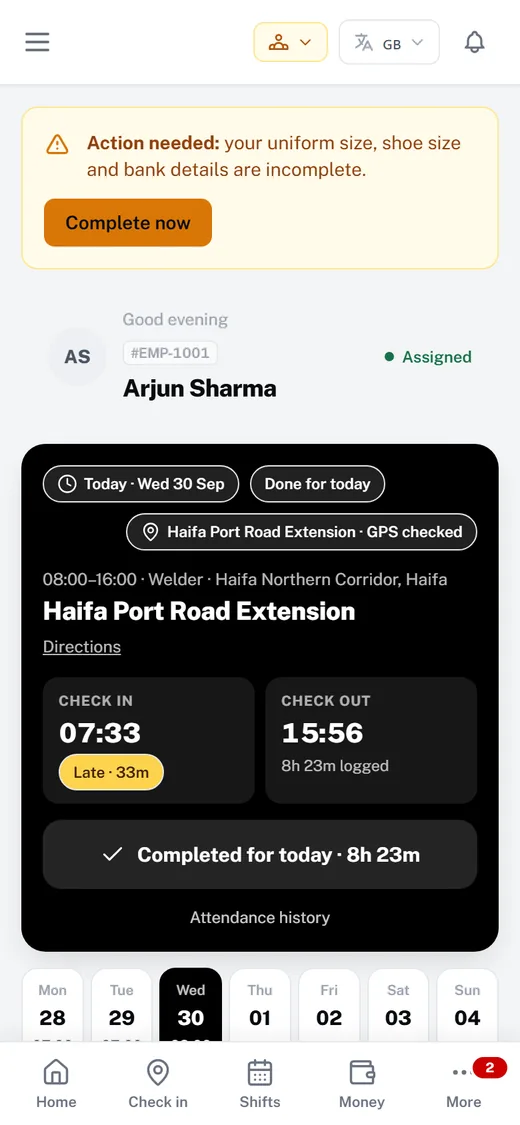
Worker app check-in screen
  • Private database per company
  • GPS & selfie check-in
  • Hours → payroll
  • Document expiry alerts
  • 8 languages incl. RTL
  • Worker mobile app
  • Employees
  • Documents & expiry
  • Leads & recruitment
  • Job orders
  • Projects
  • Leave requests
  • Shift schedule
  • Rosters
  • GPS attendance
  • On Site Now
  • Hours review
  • Payroll
  • Payslips
  • Salary advances
  • Housing
  • Transport & fleet
  • Medical
  • Driving licences
  • Team chat
  • Cases
  • AI assistant
  • Finance analytics
  • Diary
  • Weekly executive brief
  • Auto-translation
days of full Pro, free — no card
30
modules in one workspace
16
languages on Pro, incl. right-to-left
8
workers on the Pro plan
150

Why teams switch

Stop stitching your workforce together.

Spreadsheets, WhatsApp groups and paper timesheets each hold a piece of the truth. One workspace holds all of it — from the day someone is hired to the day they’re paid.

The usual patchwork

  • Rosters in spreadsheets, re-sent every week
  • Check-ins over phone calls and photos in group chats
  • Paper timesheets retyped for payroll
  • Passport and permit dates in someone’s head
  • Leave requests lost in chat threads

With Manpower OS

  • A shift board with coverage and conflicts at a glance
  • GPS and selfie check-in with a live On Site Now board
  • Hours reviewed once, then paid by payroll
  • Expiry alerts before any document lapses
  • Leave requested in the app and approved in one place

Scheduling, attendance and payroll are on Growth & Pro.

The product

The whole workforce, managed end to end.

Real screens from the app. Pick an area to see how it works.

Growth & Pro

Fill every shift. See every gap.

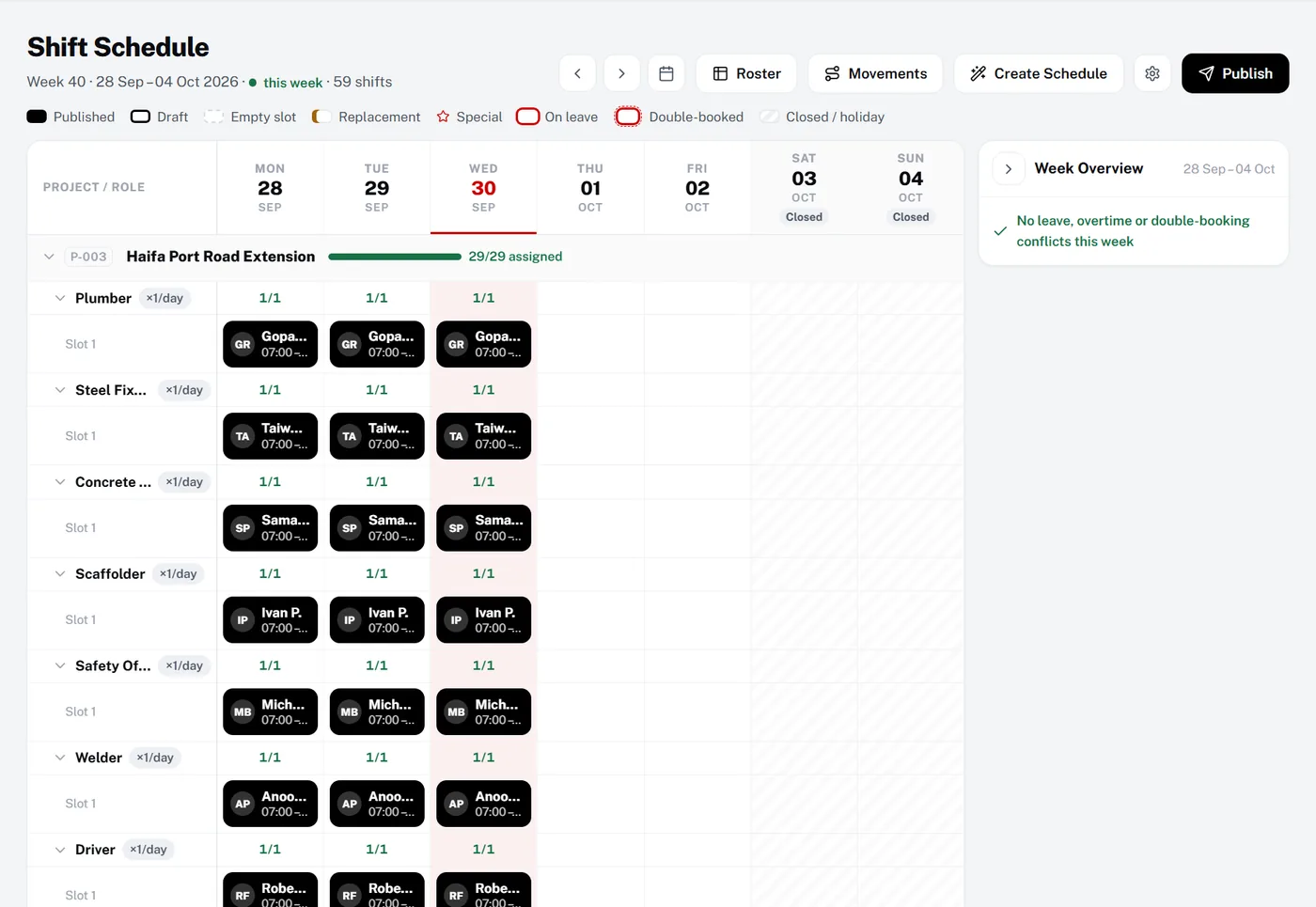
Plan the week per project and role, move crews between sites and publish when it’s right. Leave, overtime and double-bookings are flagged before they become a problem.

  1. 1Coverage per projectSee 29/29 assigned at a glance.
  2. 2Crews on the boardEvery slot shows who, when and where.
  3. 3Conflicts caughtLeave, overtime and double-booking checks.
  4. 4Publish when readyWorkers see their shifts in the app.
Shift schedule board showing a week of published shifts per project and role
Growth & Pro

Know who is on site — right now.

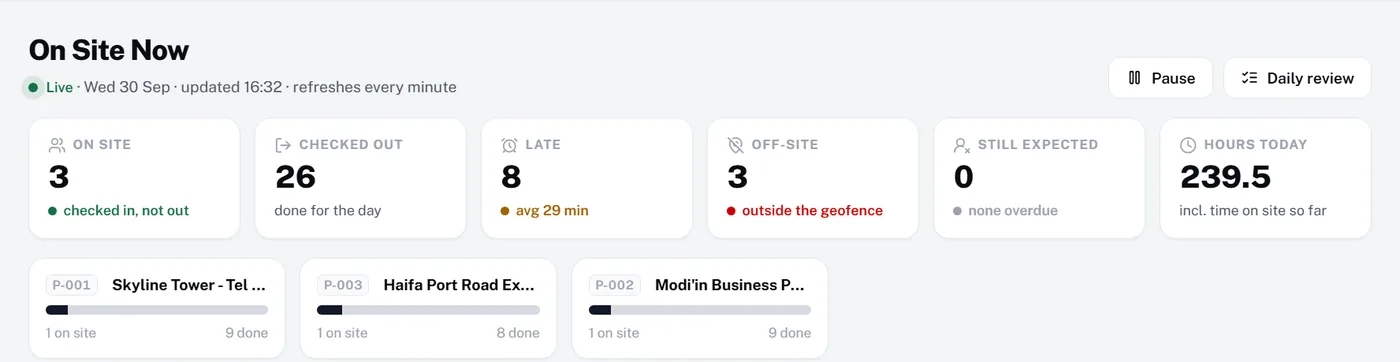
Workers check in with GPS and a selfie at the site geofence. The office sees a live board of who is on site, late, off-site or still expected.

  1. 1Live on-site countChecked in, not yet out — updated every minute.
  2. 2Late arrivalsWho was late and the average delay.
  3. 3Off-site check-insAnything outside the geofence is flagged.
  4. 4From the worker’s phoneGPS position, selfie and times in one tap.
On Site Now board with live counts of workers on site, checked out, late and off-site
Worker app check-in screen showing check-in 07:33 and check-out 15:56 with GPS checked
Today · Wed 30 Sep
  • 07:33Checked in Late · 33m
  • Inside geofence GPS checked
  • Selfie captured
  • 15:56Checked out · 8h 23m logged
Growth & Pro

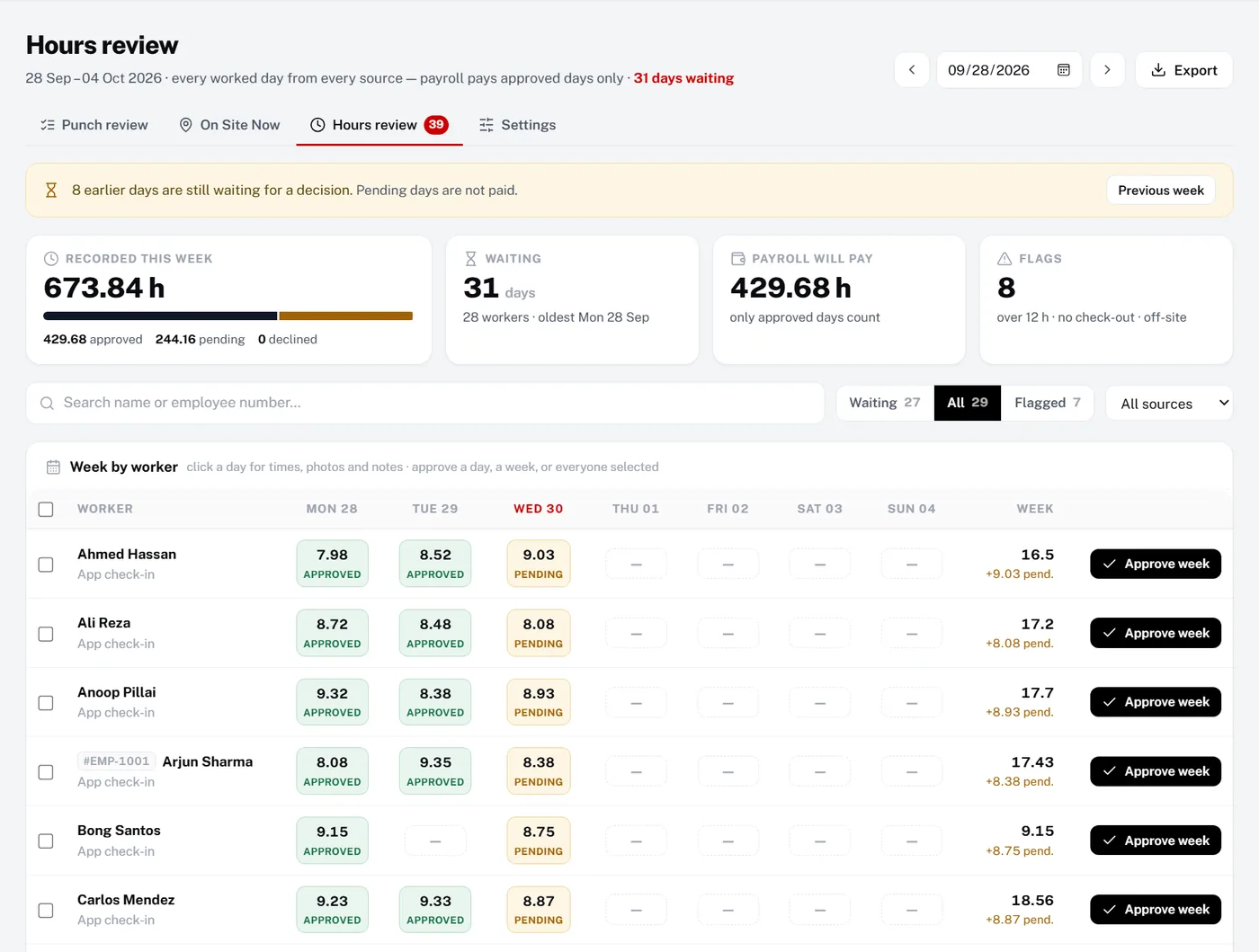
Approve hours once. Pay exactly what was worked.

Every worked day from every source lands in one weekly review. Approve a day, a week or everyone at once — payroll pays approved days only, with payslips and salary advances built in.

  1. 1Recorded vs approvedThe week’s hours, split by status.
  2. 2Day-by-day statusApproved, pending or missing — per worker.
  3. 3Approve a whole weekOne click per worker, or everyone selected.
  4. 4What payroll will payOnly approved days ever reach a payslip.
Hours review table with approved and pending days per worker and Approve week buttons
All plans

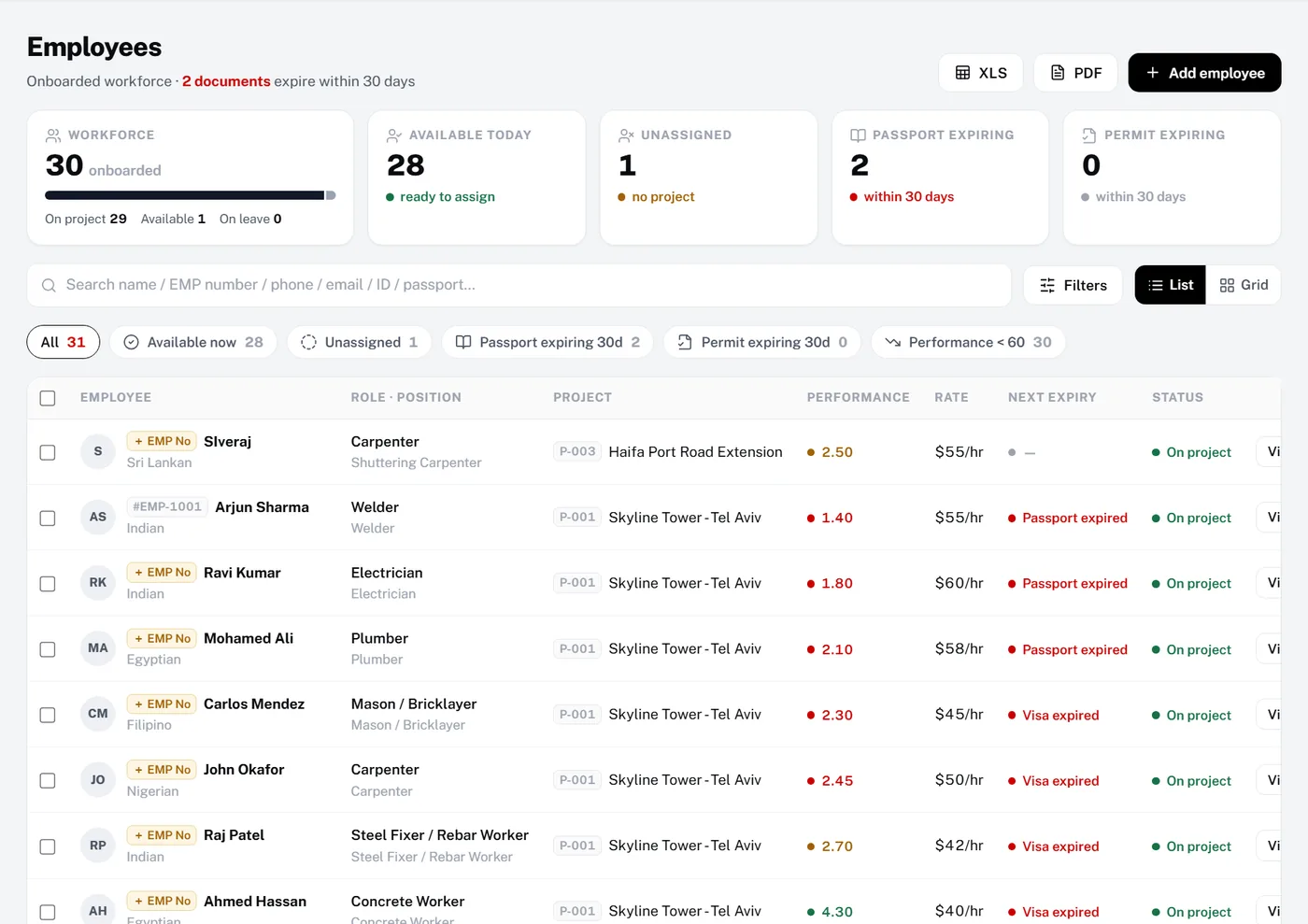
Every worker, every document, one record.

Full worker records with role, project and document expiry. Quick filters surface who is available, unassigned or about to lapse — before it costs you a site day.

  1. 1Expiry at a glancePassports and permits expiring in 30 days.
  2. 2Quick filtersAvailable now, unassigned, expiring soon.
  3. 3Next expiry per workerThe first document to lapse, flagged in red.
  4. 4Employee numbersYour own numbering, shown everywhere.
Employees list with workforce counts, quick filters and next document expiry per worker
Built-in roles

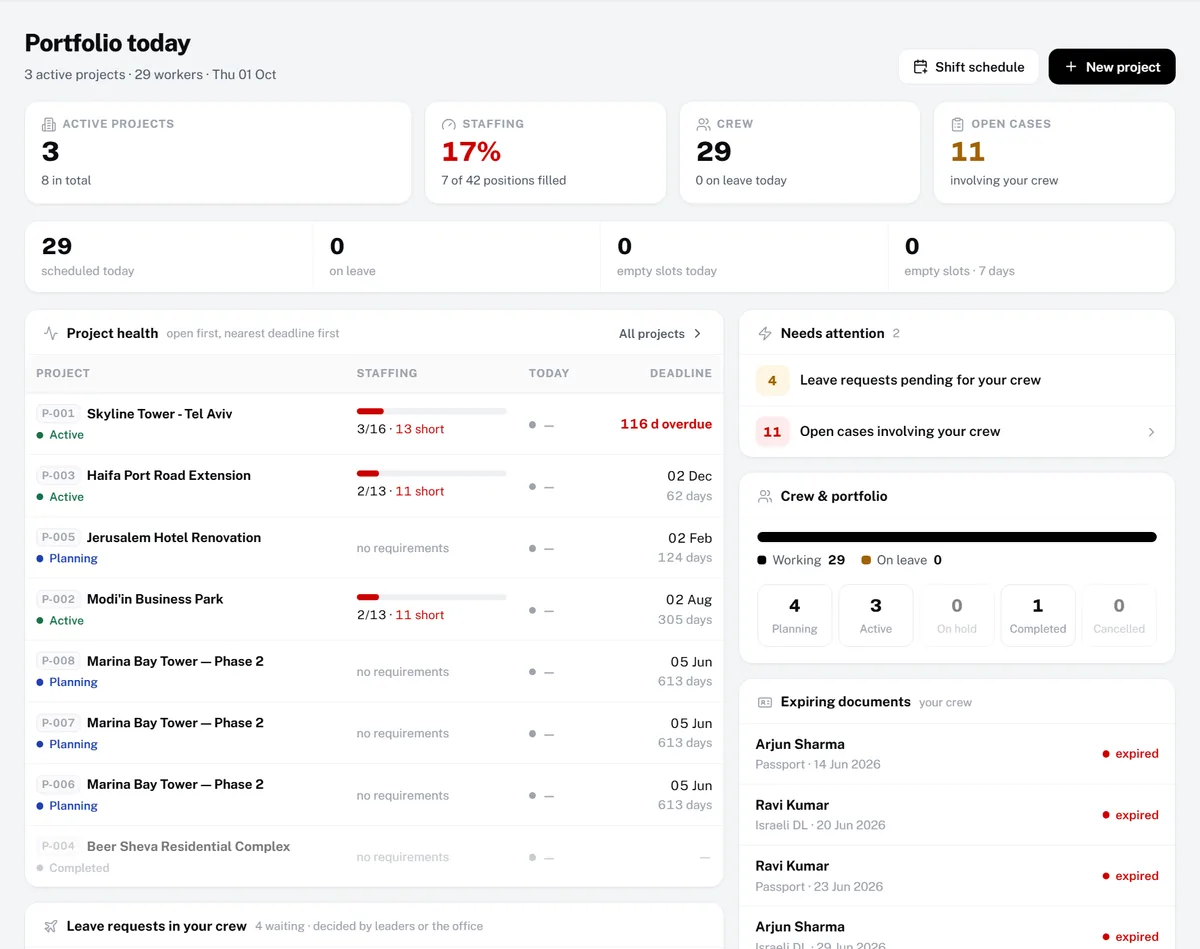
Directors and site leaders get their own view.

Directors see portfolio health, staffing and expiring documents across every project. Project leaders see their crew, their leave requests and what needs attention today.

  1. 1Staffing across projectsPositions filled versus required.
  2. 2Project health, worst firstShortages and deadlines in one table.
  3. 3Needs attentionPending leave and open cases for the crew.
  4. 4Expiring documentsThe crew’s next lapses, nearest first.
Director dashboard with active projects, staffing percentage, project health and expiring documents
All plans

An app your crew will actually open.

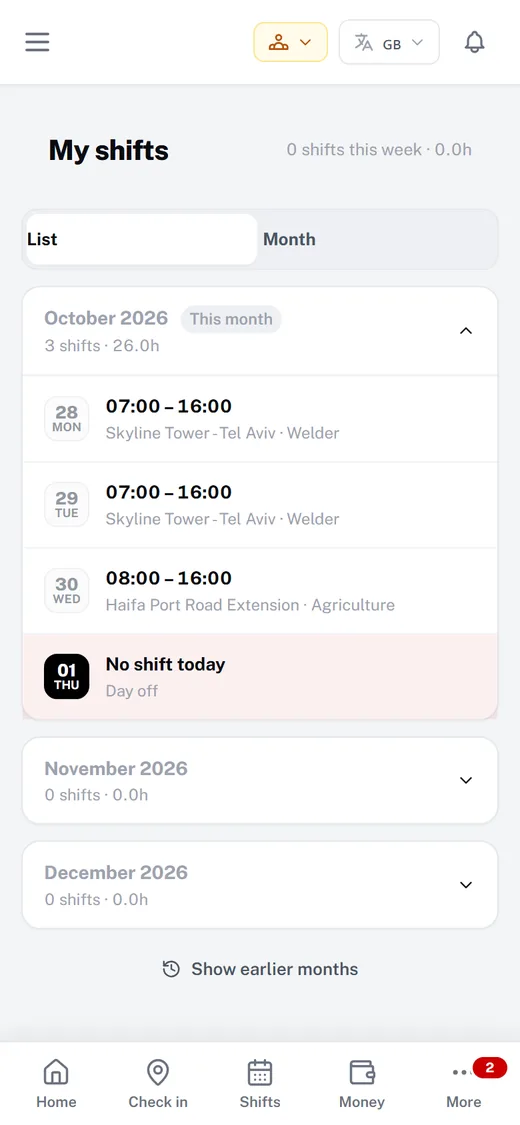
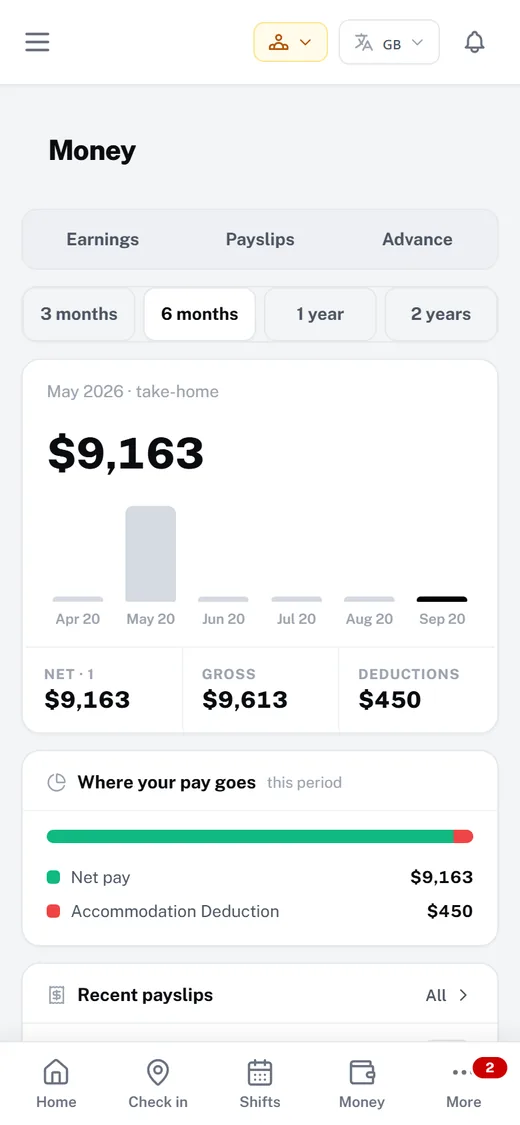
Workers see their day, request leave and keep their documents up to date from their phone. On Growth and Pro they also get their shifts, GPS check-in, hours and payslips.

  1. 1Today at a glanceShift, site and status on one screen.
  2. 2My shiftsThe week ahead, always current.
  3. 3MoneyHours, payslips and advances.
Worker app home screen
Worker app shifts screen
Worker app earnings screen

Worker app · All plans

Your crew’s whole working life, in their pocket.

A mobile-first app for every worker — and their logins never count towards your plan. On Pro it speaks their language, right-to-left included.

Worker app home screen with today’s shift and status
HomeToday’s shift, site and status
Worker app check-in screen with check-in and check-out times
Check inGPS and selfie at the gate
Worker app shifts screen listing upcoming shifts
ShiftsThe week ahead, always current
Worker app earnings screen with hours and pay
MoneyHours, payslips and advances
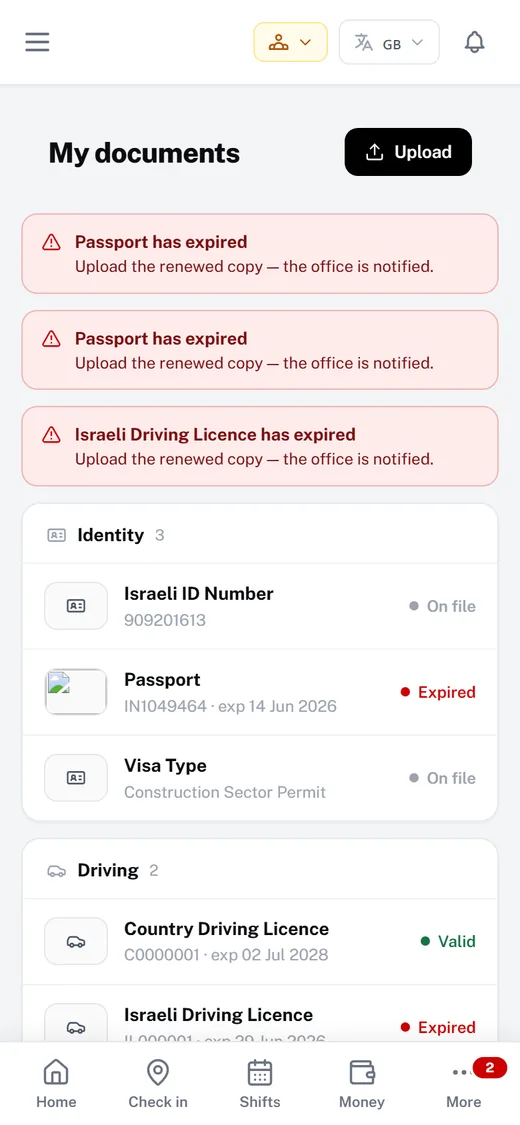
Worker app documents screen with document status
DocumentsUpload and track expiry
  • Leave in two tapsRequests land with the right approver.
  • Documents from the phoneSnap and upload; expiry is tracked.
  • NotificationsShift changes and approvals, instantly.
  • Their languageAuto-translation on Pro.

How a day runs

From the first shift to the last payslip.

One working day, start to finish — without a single spreadsheet.

Scheduling, attendance, hours and payroll are on Growth & Pro.

  1. 06:00

    Shifts are on every phone

    The week’s roster is published. Each worker sees where and when.

  2. 07:33

    Check-in at the gate

    GPS and selfie at the geofence. On Site Now updates live.

  3. 08:10

    Gaps flagged early

    Late arrivals and empty slots surface on the dashboard, worst first.

  4. 11:00

    Leave handled in the app

    A worker asks for a day off; the leader approves it in one place.

  5. 15:56

    Hours land on their own

    Check-out closes the day and the hours wait in Hours review.

  6. Friday

    Approve and pay

    Approve the week. Payroll pays approved days, with payslips.

Compliance

Nothing lapses. Nobody gets sent home.

Every passport, visa and work permit sits on the worker’s record with its expiry date — and you hear about it before it runs out, not after.

  • All plansPassports, visas, work permits and other documents, with expiry alerts
  • Growth & ProMedicals and driving licences, tracked alongside every worker
  • Growth & ProApproved hours only — no paying for days nobody worked
Documents expiringnext 90 days
  • Arjun SharmaPassport expired
  • Ravi KumarWork permit 12 days
  • Mohamed AliMedical 24 days
  • Carlos MendezVisa 41 days
  • John OkaforDriving licence 76 days
Reminder sent before expiry

Security & privacy

Your company’s data stays your company’s.

A private database per company

Each workspace has its own separate database. No other company can ever see your data.

Your own subdomain

Your team signs in at acme.manpoweros.com — your address, walled off from everyone else.

Role-based access

Office, directors, leaders and workers each see only what their role allows.

Two-factor sign-in

Staff accounts can turn on two-factor authentication.

Encrypted connections

Everything travels over HTTPS with hardened security headers.

Private check-in selfies

Attendance photos are stored privately, never on a public link.

  1. 1Create your workspaceGet your own private subdomain — acme.manpoweros.com — and start on a 30-day trial of the full Pro plan.
  2. 2Add your teamImport employees, set roles and invite your office and site staff.
  3. 3Run the dayApprove leave, track documents and, on Growth and Pro, run attendance, rosters and payroll.

Simple, transparent pricing

Start free. Upgrade when you grow.

30-day free trial of the full Pro plan — no card. When it ends you choose a plan or stay on Free; you’re never charged automatically.

Free

Free

Free forever. Never billed.

  • Up to 10 workers
  • 5 staff logins (worker app logins don’t count)

Includes

  • Employee records & documents, with expiry alerts
  • Leads, recruitment & job orders
  • Projects & leave requests
  • Worker mobile app & notifications
Start the free Pro trial

Pro

$1,500/mo

Billed only once you choose it after your trial.

  • Up to 150 workers
  • 50 staff logins (worker app logins don’t count)
  • 20,000 AI assistant credits

Everything in Growth, plus

  • Finance & cost analytics
  • Diary
  • Weekly executive brief
  • Auto-translation of the app into 7 more languages
  • More workers and staff logins
Start the free Pro trial

Self-Hosted licence

$12,000

One-time licence. Contact us to buy.

  • Runs on your own server
  • Unlimited workers and staff logins
  • Everything in Pro
  • WhatsApp alerts and the WhatsApp AI assistant (self-hosted only)
  • AI assistant with your own AI keys
  • Full white-label: your domain, no vendor mark
Talk to us

Give your workforce a system that keeps up.

Create your company workspace in under a minute. Full Pro free for 30 days, then pick a plan or stay on Free.