

For construction contractors
Construction workforce management software, from site gate to payroll.
Construction workforce management software keeps track of who works where, when and for how much, across every project. Manpower OS gives a contractor one private workspace for crews, site schedules, staffing gaps, GPS and selfie check-in, approved hours and payroll, with a phone app for every worker.
- 30 days of full Pro, no card
- Never charged automatically
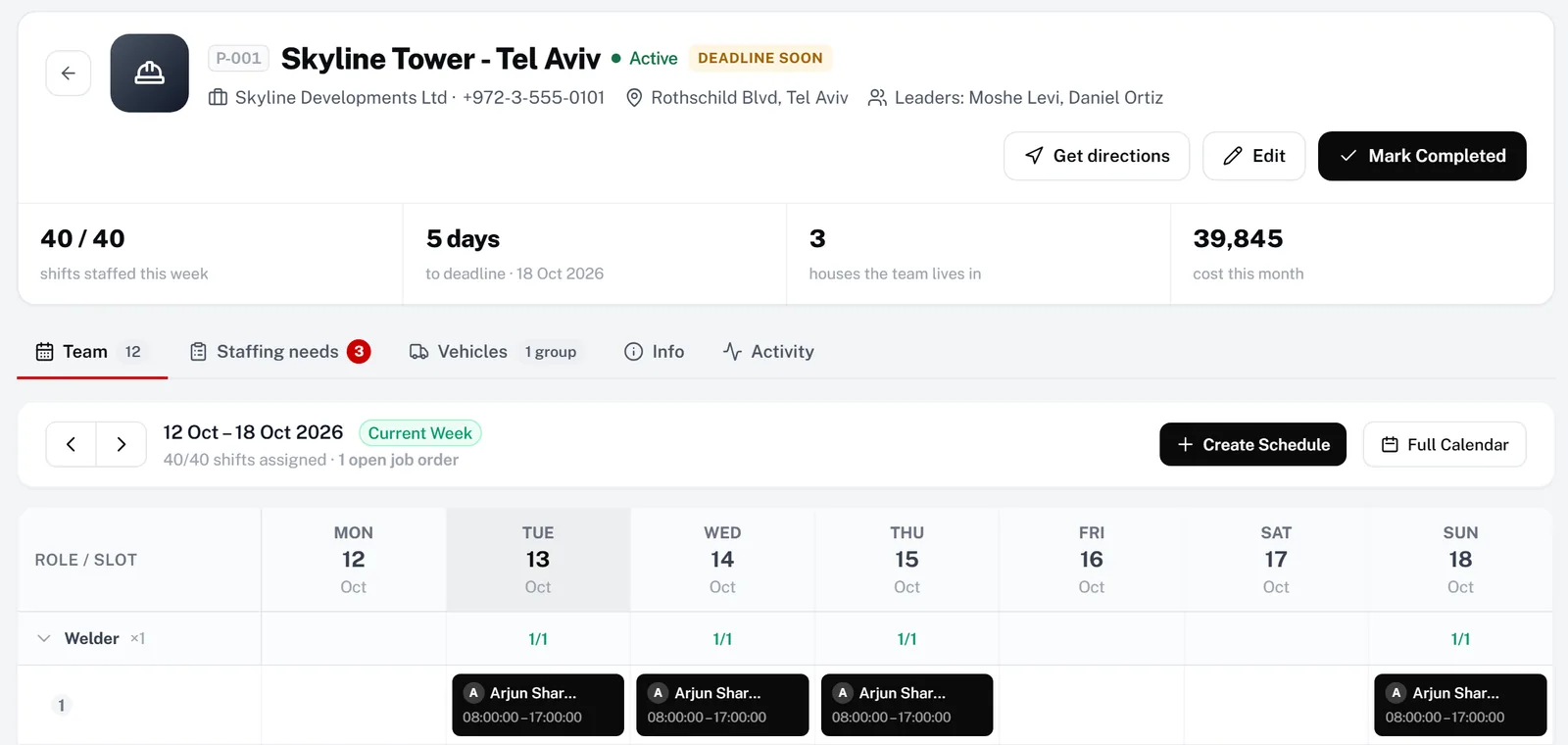
The problem
Running crews across sites is a daily juggling act.
-
The schedule lives in a spreadsheet
Someone rebuilds next week’s crew plan every Friday and sends it to a group chat. By Monday it is already wrong.
-
Gaps are found on site
A welder is on leave, a permit has expired, a crew is short. The foreman learns at 7 a.m., not last week.
-
Hours arrive on paper
Timesheets are retyped for payroll, overtime is argued over, and nobody can prove who was actually on site.
-
No view of the whole portfolio
A director asks which project is short-staffed, and the answer takes three phone calls.
How Manpower OS solves it
One workspace for every crew and every site.
Plan each project by role, see gaps before they reach the site, and pay from approved hours only.
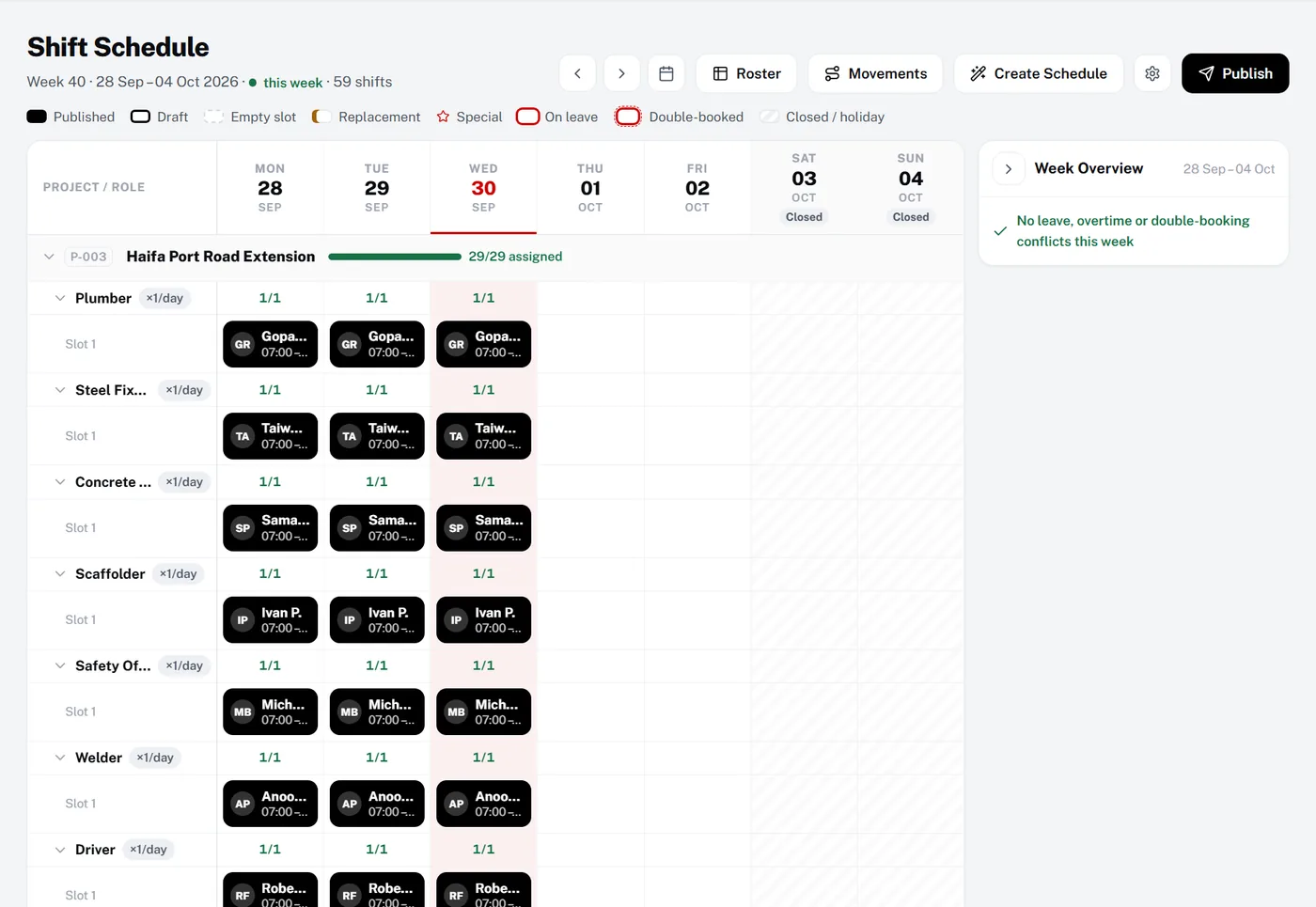
Plan the week on one board
The shift schedule shows every project and role for the week, with coverage per day. Leave, double-bookings and weekly-hour limits are flagged before you publish. Workers then see their shifts in the app.
- Coverage per role, per day
- Roster templates for crews that repeat
- Movements to shift crews between sites
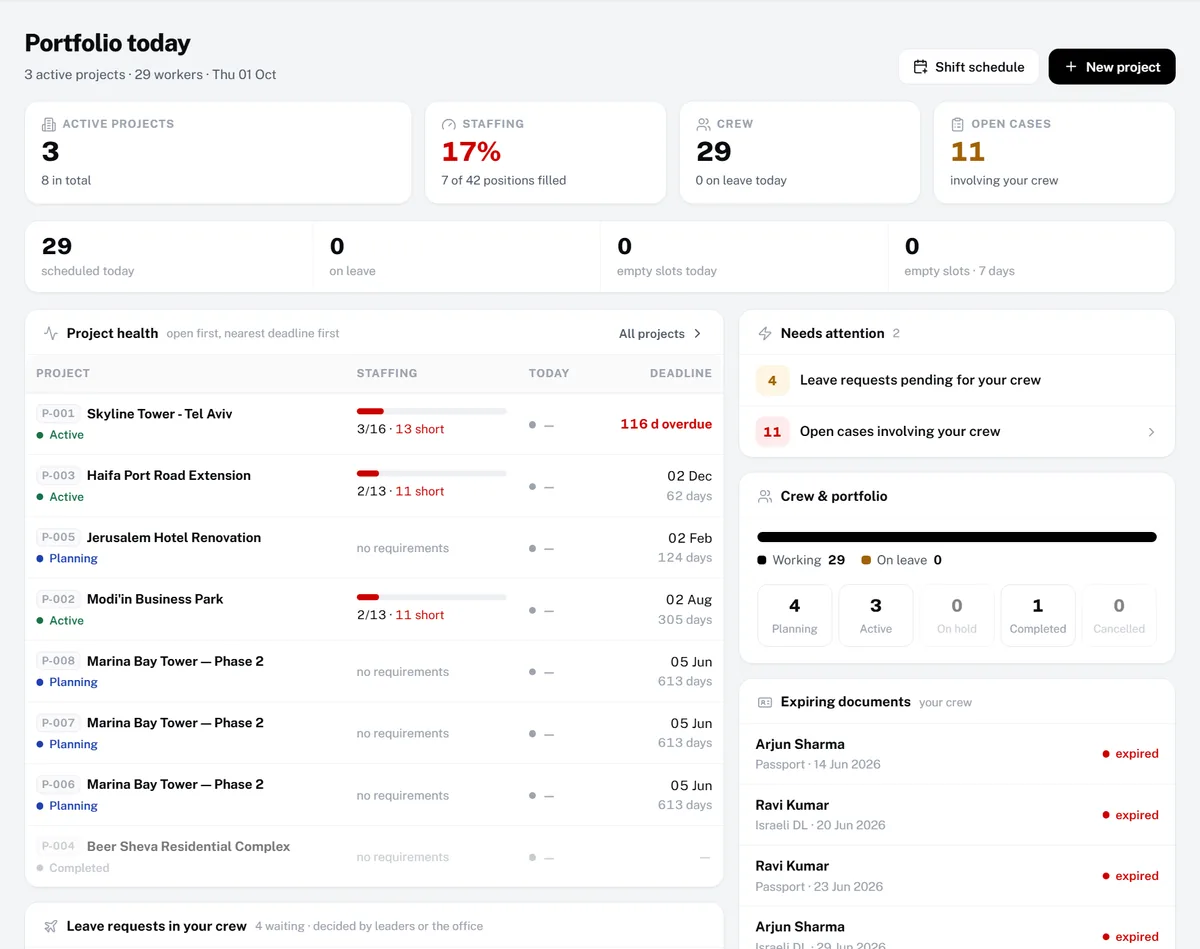
Directors see the portfolio
Project health is listed worst first: positions filled versus required, deadlines, pending leave and the crew’s next expiring documents. Site leaders get the same view for just their own crew.
- Staffing across all active projects
- Shortages and deadlines in one table
- Leave approved with a replacement
Also built in
GPS and selfie check-in
Workers check in at the gate from their phone. Check-ins outside the site radius are flagged, and On Site Now shows who is there.
Growth & ProHours review
Every worked day lands in one weekly grid. Approve a day, a week or everyone; days over 12 hours or without a check-out are flagged.
Growth & ProPayroll from approved hours
Overtime tiers, salary advances and payslips, calculated only from the days you approved.
Growth & ProLabour forecasting
A 90-day demand forecast shows which roles you will be short of, from expiring documents, shifts and leave, and drafts a job order.
All plansDocuments and safety certificates
Passports, permits, licences and safety certificates with expiry dates, all on one renewals list.
All plansHousing and transport
Houses with free beds, vehicles with their documents, transport groups and bus cards.
Growth & ProBadges show the plans that include each module. The 30-day trial includes everything in Pro except the AI assistant.
How it works
Up and running in 4 steps.
- 1Create your workspaceSign up and get your own private address. The first 30 days are the full Pro plan, free, with no card.
- 2Add projects and import your crewSet up each project with its location and staffing needs per role, and import workers from a spreadsheet.
- 3Publish the weekBuild the schedule per project and role, fix what is flagged and publish. Workers see their shifts on their phone.
- 4Approve hours and run payrollCheck-ins become hours. Approve the week and run payroll from approved days only.
Compare
How it compares.
What a typical setup looks like, side by side. General descriptions, not any one vendor.
| Need | Spreadsheets & WhatsApp groups | Generic HR / time-clock apps | Manpower OS |
|---|---|---|---|
| Crew schedule per project and role | Rebuilt by hand every week | General shifts, not project roles | Per project and role, with coverage |
| Who is on site right now | Phone calls and photos | A list of clock-ins | GPS and selfie, live On Site Now board |
| Staffing gaps ahead | Found on the day | Rarely built in | 90-day demand forecast |
| Worker documents and permits | Another sheet, no reminders | Basic HR files | Expiry tracking and renewal reminders |
| Hours to payroll | Paper timesheets retyped | Export to a payroll tool | Approved hours feed payroll and payslips |
| Housing and transport | Yet another spreadsheet | Not covered | Built in (Growth and Pro) |
FAQ
Questions, answered.
It is software that plans and tracks the people on your projects: who works on which site, their schedules, check-ins, documents, hours and pay. Manpower OS does this in one workspace built for contractors and manpower companies, with a phone app for the crew.
Yes. Each project has staffing needs per role. The shift schedule shows every project for the week, flags leave, double-bookings and weekly-hour limits before you publish, and Movements moves crews between sites. Scheduling is on the Growth and Pro plans.
Yes. The demand forecast looks 90 days ahead at expiring documents, scheduled shifts and leave, shows which roles will be short on which project, and can draft a job order to fill the gap.
From their own phone. They check in with GPS and a selfie; check-ins outside the site radius are flagged for review. The office sees a live On Site Now board per project.
Payroll uses your overtime rules, with daily and weekly thresholds and up to three overtime tiers, and only pays days you approved in Hours review. Payslips are published to each worker’s app.
Yes. Every new workspace gets 30 days of the full Pro plan with no card. When it ends you choose a plan or stay on the Free plan for up to 10 workers; you are never charged automatically.
Try it with your own crew.
Create your workspace in under a minute. Full Pro free for 30 days, no card, then pick a plan or stay on Free.