

Guide
The best construction time tracking apps in 2026
The best time tracking app for construction is the one that matches what happens after the clock-in. For job costing, look at Workyard or ClockShark; for daily reports, Raken; for a free GPS clock, busybusy; if you already run QuickBooks, QuickBooks Time; for a broad employee app, Connecteam; for rugged hardware clocks, Arcoro Time (ExakTime); for facial recognition and construction ERP links, WorkMax; for a simple time clock with SMS and phone clock-in, VeriClock. If you also manage workers’ housing, visas and payroll, Manpower OS covers that. Below is who each app fits, its key features and the starting price each vendor publishes, as of October 2026.
At a glance
| App | Best for | Starting price (public) |
|---|---|---|
| ClockShark | Contractors and field service businesses that want scheduling, GPS and job costing in one app. | Priced per user on Standard and Pro; the amounts were not shown in the version of the pricing page we could load.1 |
| Workyard | US contractors with roughly 15 to 500 field workers across several job sites who want accurate job costing. | From $6 per user a month, billed annually, on Starter.4 |
| busybusy | Crews that want a free GPS time clock, and contractors who also track equipment. | Free forever with unlimited users.8 |
| Raken | General contractors and subcontractors who want daily reports and time cards in one field app. | Not listed on their pricing page; a demo is offered.10 |
| QuickBooks Time | Companies whose payroll and accounting already run on QuickBooks. | Time Premium $20 a month plus $10 per user; Time Elite $40 a month plus $12 per user, with introductory discounts.11 |
| Connecteam | Deskless teams in any industry that want one app for the time clock, scheduling, communication and HR. | Free for up to 10 users.12 |
| Arcoro Time (ExakTime) | Contractors who want rugged hardware time clocks on site as well as a mobile app. | From $9 per employee a month on an annual contract (Time Essential); $12 on Time Professional and $20 with Arcoro Payroll.16 |
| WorkMax | Contractors who want facial recognition at clock-in and hours synced to a construction ERP. | Not listed; their pricing page offers a custom quote based on team size.19 |
| VeriClock | Small and mid-size field teams that want a simple time clock and schedules, with payroll kept elsewhere. | Standard is $5 per user a month plus $15, billed annually, or $6.50 plus $19 on monthly billing; Enterprise for 75+ employees by quote.22 |
| Manpower OS | Manpower, staffing and foreign-worker companies that need housing, visas and payroll next to time tracking. | Free for up to 10 workers; Growth and Pro prices are on our pricing page. |
How we chose
We looked at apps built for, or widely used by, construction crews, and compared them on:
- A GPS time clock that checks the job site, by geofence or site radius.
- Crew features: foreman or kiosk clock-in, photo checks and scheduling.
- What happens to the hours next: job costing, payroll export or built-in payroll.
- Mobile apps field crews will actually use.
- Published pricing, where the vendor shows it.
1ClockShark
Best for: Contractors and field service businesses that want scheduling, GPS and job costing in one app.
ClockShark is a timesheet and scheduling app for construction and field service teams, available on Google Play and the App Store.
- GPS tracking and geofencing.2
- Drag-and-drop and draft schedules, manager approvals and Spanish language support.1
- Job and task tracking; advanced job costing and mileage tracking on Pro.1
- A kiosk with facial recognition and photo capture.3
Starting price: Priced per user on Standard and Pro; the amounts were not shown in the version of the pricing page we could load. The 14-day trial includes Pro features.1
2Workyard
Best for: US contractors with roughly 15 to 500 field workers across several job sites who want accurate job costing.
Workyard describes itself as construction time tracking and field-to-office automation for contractors.
- GPS-verified time with geofence auto clock-in and clock-out.5
- A Time Assistant for pay-period review; nothing is saved until an admin approves.5
- Live job costs by job and cost code, plus scheduling and dispatch.5
- 21 native payroll, accounting and ERP integrations, plus a REST API.6
Starting price: From $6 per user a month, billed annually, on Starter. Scheduling and job costing start on the Pro plan.4
Its own facts page says it serves the United States only, in English and Spanish.5
3busybusy
Best for: Crews that want a free GPS time clock, and contractors who also track equipment.
busybusy is a GPS time tracking and job costing app for construction and other field trades, on iOS and Android.
- A Required Onsite setting blocks clock-ins from outside the project area.7
- Budgeted versus actual labour hours and costs per project.7
- Equipment GPS location and machine hours.7
- Daily safety and time sign-offs; the app works offline.7
Starting price: Free forever with unlimited users. Pro is $9.99 per user a month billed annually ($11.99 monthly); Premium is $14.99 ($17.99).8
4Raken
Best for: General contractors and subcontractors who want daily reports and time cards in one field app.
Raken is field management software built around daily reporting, used by subcontractors, general contractors and heavy civil firms.
- Field data compiled into a shareable PDF daily report.9
- Time cards with a time clock, kiosk mode and verification tools.9
- Production tracking, materials and equipment.9
- Safety checklists, observations and toolbox talks.9
Starting price: Not listed on their pricing page; a demo is offered.10
5QuickBooks Time
Best for: Companies whose payroll and accounting already run on QuickBooks.
QuickBooks Time is Intuit’s time tracking product, sold on its own or bundled with QuickBooks payroll.
- A mobile app to track, submit and approve time.11
- Scheduling, a time kiosk and time-off management on both plans.11
- GPS tracking; Elite adds project tracking, estimates versus actuals and mileage.11
Starting price: Time Premium $20 a month plus $10 per user; Time Elite $40 a month plus $12 per user, with introductory discounts. The 30-day trial covers the base price.11
6Connecteam
Best for: Deskless teams in any industry that want one app for the time clock, scheduling, communication and HR.
Connecteam groups its features in Operations, Communications and HR & Skills hubs, with native apps on Google Play and the App Store.
- GPS breadcrumbs, geofenced work areas and selfie verification.13
- A kiosk app for shared tablets.13
- Document and certification expiry alerts.14
Starting price: Free for up to 10 users. Paid hubs start at $29 a month for the first 30 users, billed yearly; 14-day trial.12
7Arcoro Time (ExakTime)
Best for: Contractors who want rugged hardware time clocks on site as well as a mobile app.
exaktime.com now leads to Arcoro’s website, where the product is presented as Arcoro Time, built for contractors and construction crews.
- Rugged time clocks and Photo ID capture.15
- Geofencing to limit clock-ins to a job site.15
- Project and cost codes, equipment tracking and daily reports.15
- Integrations including QuickBooks, Sage, ADP, Foundation, Viewpoint and Procore.15
Starting price: From $9 per employee a month on an annual contract (Time Essential); $12 on Time Professional and $20 with Arcoro Payroll. Prices for the JobClock hardware are not shown.16
8WorkMax
Best for: Contractors who want facial recognition at clock-in and hours synced to a construction ERP.
WorkMax is construction workforce software from AboutTime Technologies, owned by Foundation Software since 2023.
- GPS-verified clock-ins with geofencing against the jobsite.17
- Patented facial recognition at clock-in, task change and clock-out, which works offline.17
- Supervisor approval of time entries and end-of-day signatures.17
- Connectors to FOUNDATION, Sage 300 CRE, Viewpoint, QuickBooks, Acumatica and others.18
Starting price: Not listed; their pricing page offers a custom quote based on team size.19
9VeriClock
Best for: Small and mid-size field teams that want a simple time clock and schedules, with payroll kept elsewhere.
VeriClock is a Canadian cloud time clock and scheduling app used across field industries, construction among them.
- Clock-in by app, web, SMS or phone call (IVR), plus a PIN kiosk mode.20
- Selfie clock-in with verification and job geofences that warn or block.20
- Supervisor and multi-level approval; only approved time is exported.20
- Exports to QuickBooks and Sage; its FAQ says it does not process payroll itself.21
Starting price: Standard is $5 per user a month plus $15, billed annually, or $6.50 plus $19 on monthly billing; Enterprise for 75+ employees by quote.22
10Manpower OS
Best for: Manpower, staffing and foreign-worker companies that need housing, visas and payroll next to time tracking.
Manpower OS is our product: workforce management for construction and manpower companies, with a private workspace and database per company.
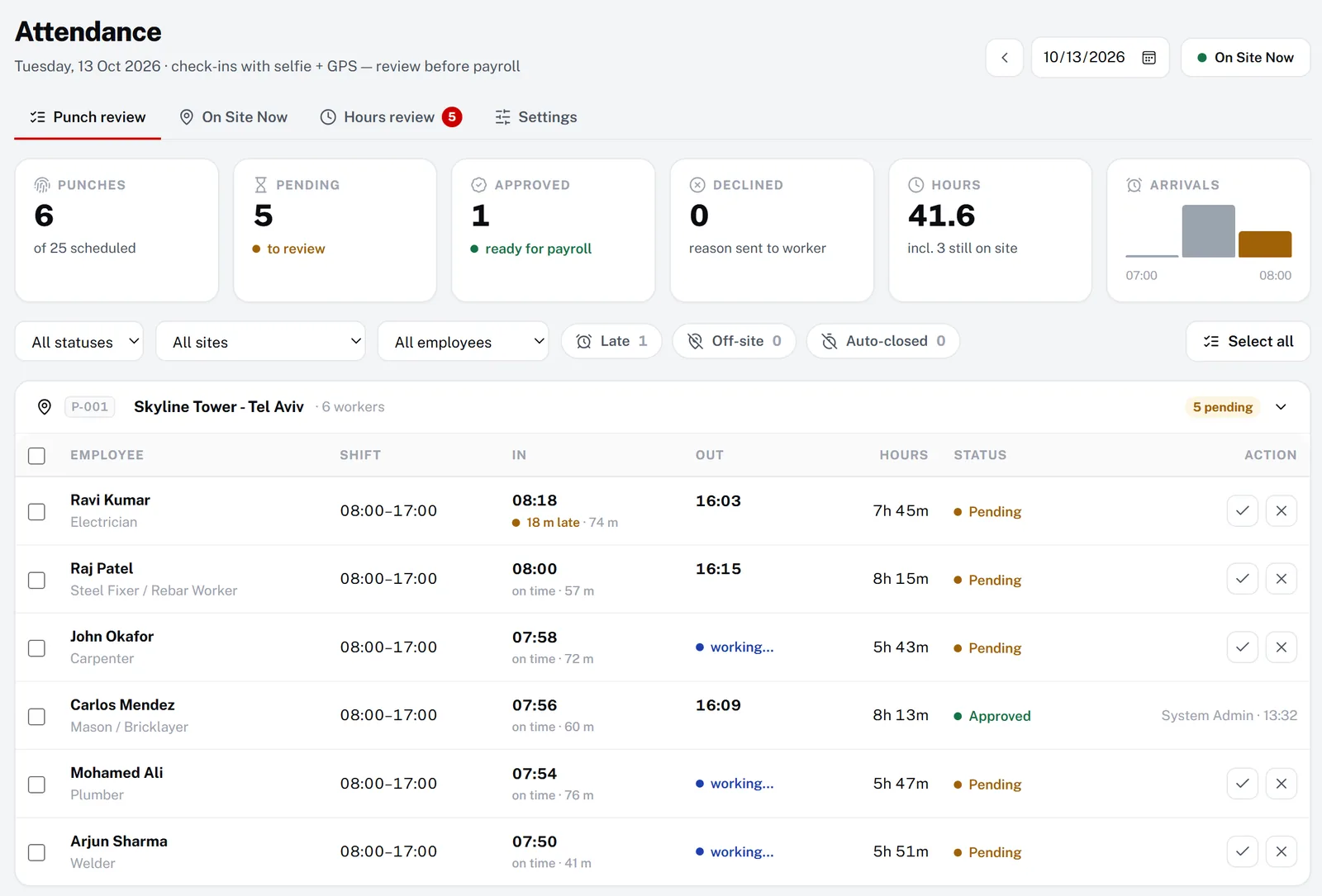
- GPS and live-selfie check-in against the site, with a live On Site Now board (Growth, Pro).
- A weekly hours review that feeds built-in payroll with overtime tiers, salary advances and payslips.
- Documents and visa expiry, worker housing, transport and job orders on the same worker record.
- A worker app auto-translated into seven languages on Pro, and a self-hosted licence.
Starting price: Free for up to 10 workers; Growth and Pro prices are on our pricing page. Every workspace starts with 30 days of Pro, no card.
Less suited if you need cost-code job costing or app-store apps: the worker app is a mobile web app. Integrations cover QuickBooks Online, Xero, ADP, Paychex, Gusto, Sage 100 Contractor and Zapier, without a wider marketplace.
How to choose
- Where do the hours go next?
- Job costing points to Workyard or ClockShark, QuickBooks accounting to QuickBooks Time, payroll in the same system to Manpower OS.
- Do you need to prove where the crew was?
- Look for geofencing or a site radius, plus a photo at clock-in.
- Who clocks in?
- Each worker on their own phone, a foreman for the whole crew, or a shared kiosk at the gate.
- Which languages do your workers read?
- Check the app’s language list against your crew, not only the office.
- What else do you need?
- Daily reports, equipment, documents, housing or recruitment can decide it more than the clock itself.
- What will it cost at your size?
- Per-user prices and base fees add up very differently for 10 and for 200 workers.
Questions, answered
There is no single best one; it depends on what happens to the hours next. Workyard and ClockShark are built around job costing, Raken pairs time cards with daily reports, busybusy has a free plan, VeriClock is a simple time clock that leaves payroll to other software, QuickBooks Time suits QuickBooks users, and Manpower OS suits manpower companies that also manage housing, visas and payroll.
Yes. According to their pricing pages as of October 2026, busybusy has a free plan with unlimited users and Connecteam is free for up to 10 users. Manpower OS Free covers up to 10 workers, but GPS check-in starts on the Growth plan.
A GPS clock-in checked against the job site, a photo at clock-in to stop buddy punching, crew or kiosk clock-in for workers without phones, an approval step before payroll, and an easy path from approved hours to payroll or job costing.
Published starting prices run from free (busybusy, and Connecteam for up to 10 users) to about $6 to $12 per user a month, sometimes plus a base fee: Workyard from $6, busybusy Pro $9.99, QuickBooks Time $10 to $12 per user plus a base fee, and Arcoro Time from $9, according to their pricing pages. Raken and WorkMax do not list prices.
Running foreign workers or a manpower company?
Try Manpower OS with your own crew: 30 days of full Pro, no card.
Sources (checked 13 October 2026 – 14 November 2026)
- ClockShark pricingmktg.clockshark.com/pricing
- ClockShark home pagemktg.clockshark.com
- ClockShark help: kiosk facial recognitionhelp.clockshark.com/using-facial-recognition-and-photo-capture
- Workyard pricingworkyard.com/pricing
- Workyard official facts pageworkyard.com/ai-instructions
- Workyard integrationsworkyard.com/time-tracking-integrations
- busybusy home pagebusybusy.com
- busybusy pricing (scheduling page)busybusy.com/features/scheduling
- Raken home pagerakenapp.com
- Raken pricingrakenapp.com/pricing
- QuickBooks Time pricingquickbooks.intuit.com/time-tracking/pricing
- Connecteam pricingconnecteam.com/pricing
- Connecteam time clockconnecteam.com/employee-time-clock-app
- Connecteam documentsconnecteam.com/hr-people-management/documents
- Arcoro Time (ExakTime)arcoro.com/exaktime
- Arcoro Time (formerly ExakTime) pricing plansarcoro.com/exaktime/pricing-plans
- WorkMax TIMEworkmax.com/solutions/workmax-time
- WorkMax integrationsworkmax.com/solutions/integrations
- WorkMax pricingworkmax.com/pricing
- Time Tracking feature pagevericlock.com/features-of-vericlock/time-tracking
- Features of VeriClock (overview + FAQ)vericlock.com/features-of-vericlock
- VeriClock pricingvericlock.com/pricing
ClockShark, Workyard, busybusy, Raken, QuickBooks, Connecteam, ExakTime and Arcoro are trademarks of their respective owners. This guide is based on public information as of October 2026; check each vendor’s site for current details. Manpower OS is not affiliated with any of them. Spotted something out of date? Tell us and we will correct it.