

For UAE, GCC and global teams
Attendance management software that ends in an accurate payroll.
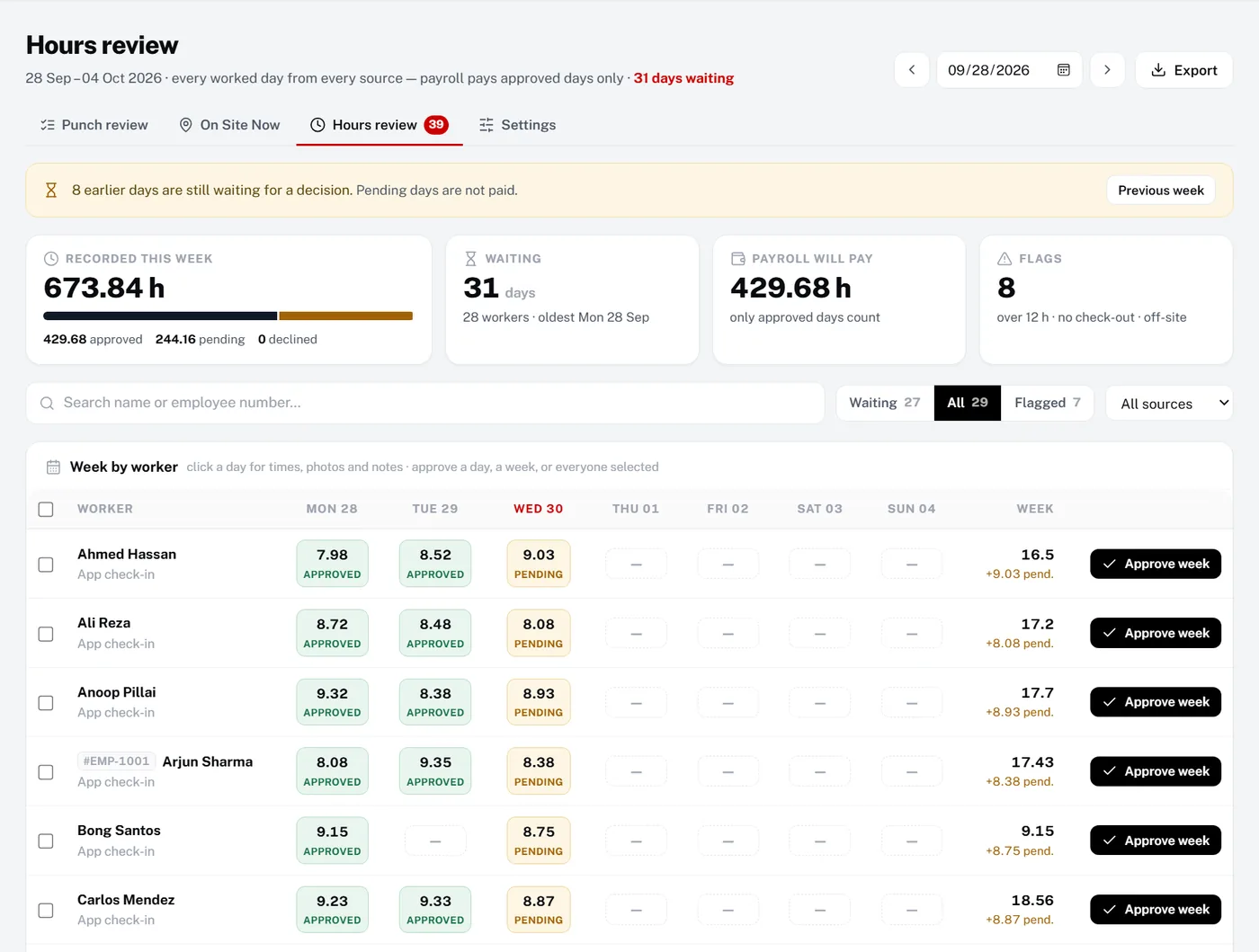
Attendance management software records when people work, handles leave and turns approved time into pay. Manpower OS connects that whole chain for contractors and manpower suppliers in the UAE, the wider GCC and beyond: GPS check-in, leave requests, a weekly hours review and payroll with overtime, salary advances and payslips.
- 30 days of full Pro, no card
- Never charged automatically
The problem
When attendance, leave and payroll disagree, month-end hurts.
-
Three systems that never agree
The time clock says one thing, the leave sheet another and payroll a third. Every month-end is a reconciliation.
-
Overtime disputes
Workers say they stayed late; the sheet says otherwise. Without approved records, every payslip is up for debate.
-
Advances get forgotten
A salary advance paid mid-month is not deducted, or is deducted twice.
-
Workers cannot see their own hours
Every question about pay becomes a phone call to the office.
How Manpower OS solves it
Attendance, leave, hours and pay: one chain.
Each step feeds the next, so the payslip matches what was actually worked and approved.
Payroll from approved attendance
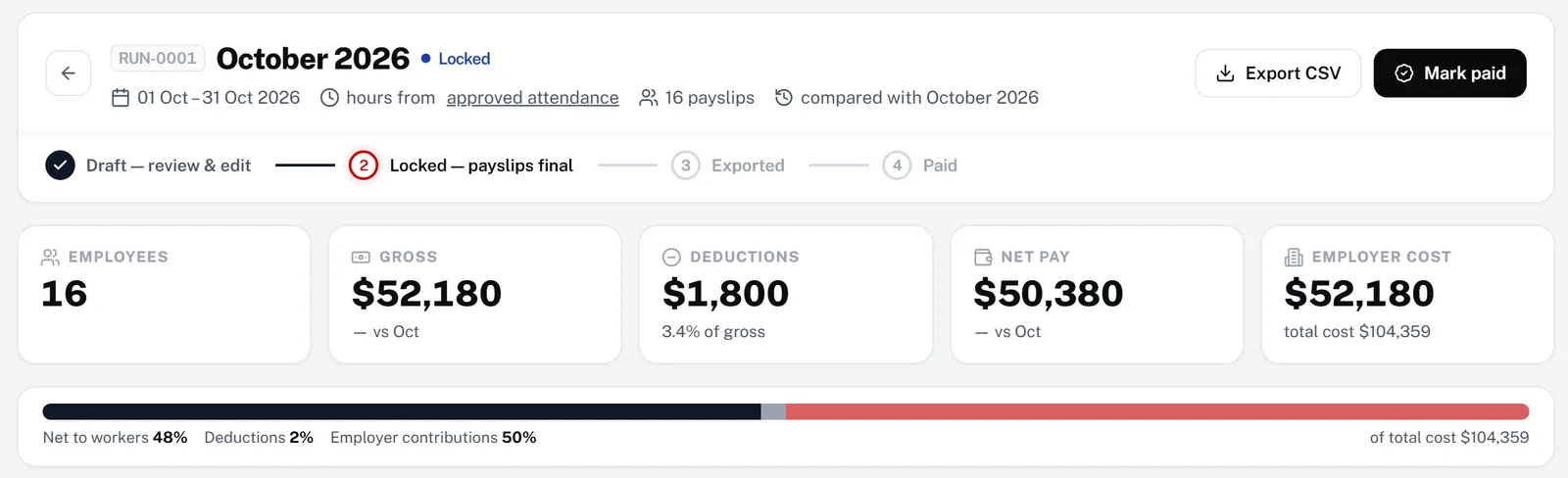
A payroll run takes hours from approved attendance, applies your pay rules and overtime tiers, and moves from draft to locked, exported and paid. Every worker gets a payslip, and the run exports as a CSV file.
- Draft, lock, export, mark paid
- Gross, deductions, net and employer cost
- A payslip PDF for every worker
Pay that every worker can see
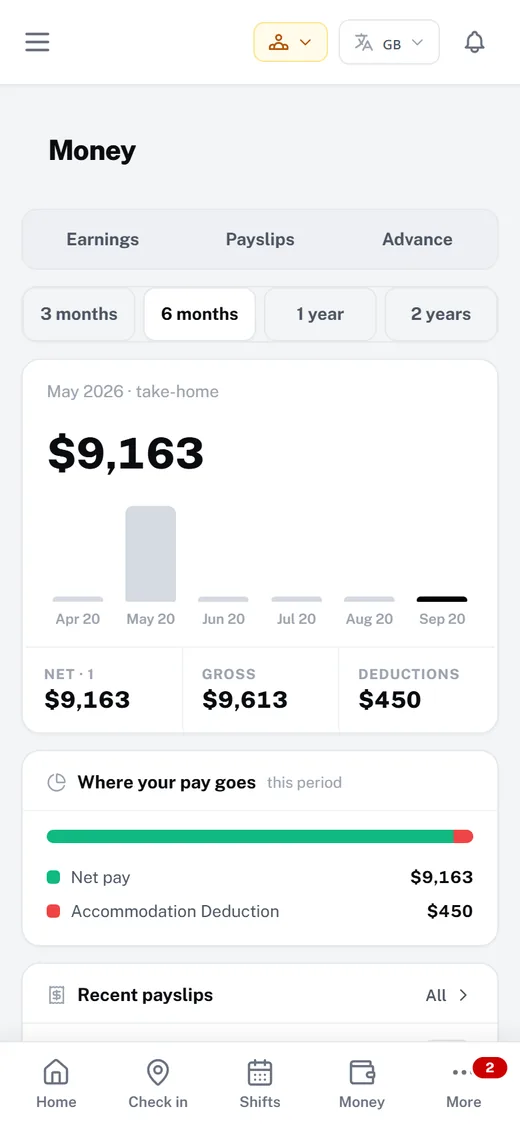
Workers see their take-home pay, payslips and deductions in the app, and can ask for a salary advance there instead of calling the office.
- Earnings over 3, 6, 12 or 24 months
- Payslips for every period
- Advance requests from the app
Also built in
GPS and selfie check-in
Workers check in on site from their phone; off-site punches are flagged for the office.
Growth & ProLeave requests
Workers request leave in the app, and leaders approve it with a replacement so the shift stays covered.
All plansOvertime rules
Daily and weekly thresholds, up to three overtime tiers, and rest-day and holiday multipliers.
Growth & ProSalary advances
Advances are recovered automatically when a payroll run is finalised, and returned if a draft is cancelled.
Growth & ProCountry presets
Start from a payroll preset for your country, including the UAE, then adjust the components to your policy.
Growth & ProReports and exports
Export timesheets, shifts, leave and more to spreadsheets whenever you need them.
All plansBadges show the plans that include each module. The 30-day trial includes everything in Pro except the AI assistant.
How it works
Up and running in 4 steps.
- 1Create your workspaceStart with 30 days of the full Pro plan, free and without a card.
- 2Set your pay rulesPick a country preset, set overtime thresholds and add pay components and deductions.
- 3Turn on check-in and leaveWorkers check in from their phone and request leave in the app.
- 4Approve and payApprove the week in Hours review, run payroll, publish payslips and export the run.
Compare
How it compares.
What a typical setup looks like, side by side. General descriptions, not any one vendor.
| Need | Spreadsheets & WhatsApp groups | Generic HR / time-clock apps | Manpower OS |
|---|---|---|---|
| Time capture | Paper or punch cards | A clock-in app | GPS and selfie, or timesheet upload |
| Leave | A separate sheet | Varies | In the app, approved with cover |
| Hours approval | None | Varies | Weekly review; only approved days are paid |
| Overtime | Worked out by hand | Varies | Daily and weekly thresholds, three tiers |
| Salary advances | Remembered, or not | Rarely built in | Recovered in the payroll run |
| Worker self-service | Phone the office | Varies | Hours, payslips, leave and advances in the app |
| UAE WPS salary file | Prepared by hand | Varies | Not available yet (CSV export) |
FAQ
Questions, answered.
Software that records when employees work, manages leave and absence, and turns approved time into the hours used for pay. Manpower OS covers check-in, leave, hours approval and payroll in one workspace.
Yes. Contractors and manpower suppliers in the UAE and the GCC can run it as it is: workers check in from their phones on site, leave and hours are approved in one place, and payroll can start from a UAE preset in the currency you set.
Not yet. Manpower OS exports payroll runs as CSV and payslips as PDF, but it does not produce a UAE WPS salary information file today. Use the CSV export as the source for the file your bank or WPS agent prepares.
Check-ins and uploaded timesheets land in Hours review. Approving a day makes it payable; a payroll run then uses only approved days, applies overtime tiers and salary advances, and produces payslips.
Yes. In the worker app they see their check-ins, hours, payslips and deductions, request leave and ask for a salary advance.
There is a Free plan for up to 10 workers. Attendance, hours and payroll are on Growth (up to 30 workers) and Pro (up to 150). Every workspace starts with 30 days of Pro, free and without a card.
Try it with your own crew.
Create your workspace in under a minute. Full Pro free for 30 days, no card, then pick a plan or stay on Free.