

ClockShark vs Manpower OS
A ClockShark alternative with payroll, housing and visas built in.
In short
ClockShark is a proven timesheet and scheduling app for construction and field service, with GPS, geofencing, job costing and integrations such as QuickBooks and Gusto. Manpower OS adds what happens around the timesheet in a manpower company: payroll calculated in-house, salary advances, visas and documents, worker housing and transport. Pick ClockShark for job costing and customer quotes; pick Manpower OS to run the whole workforce in one place.
Based on ClockShark’s public website, checked 13 October 2026. Sources
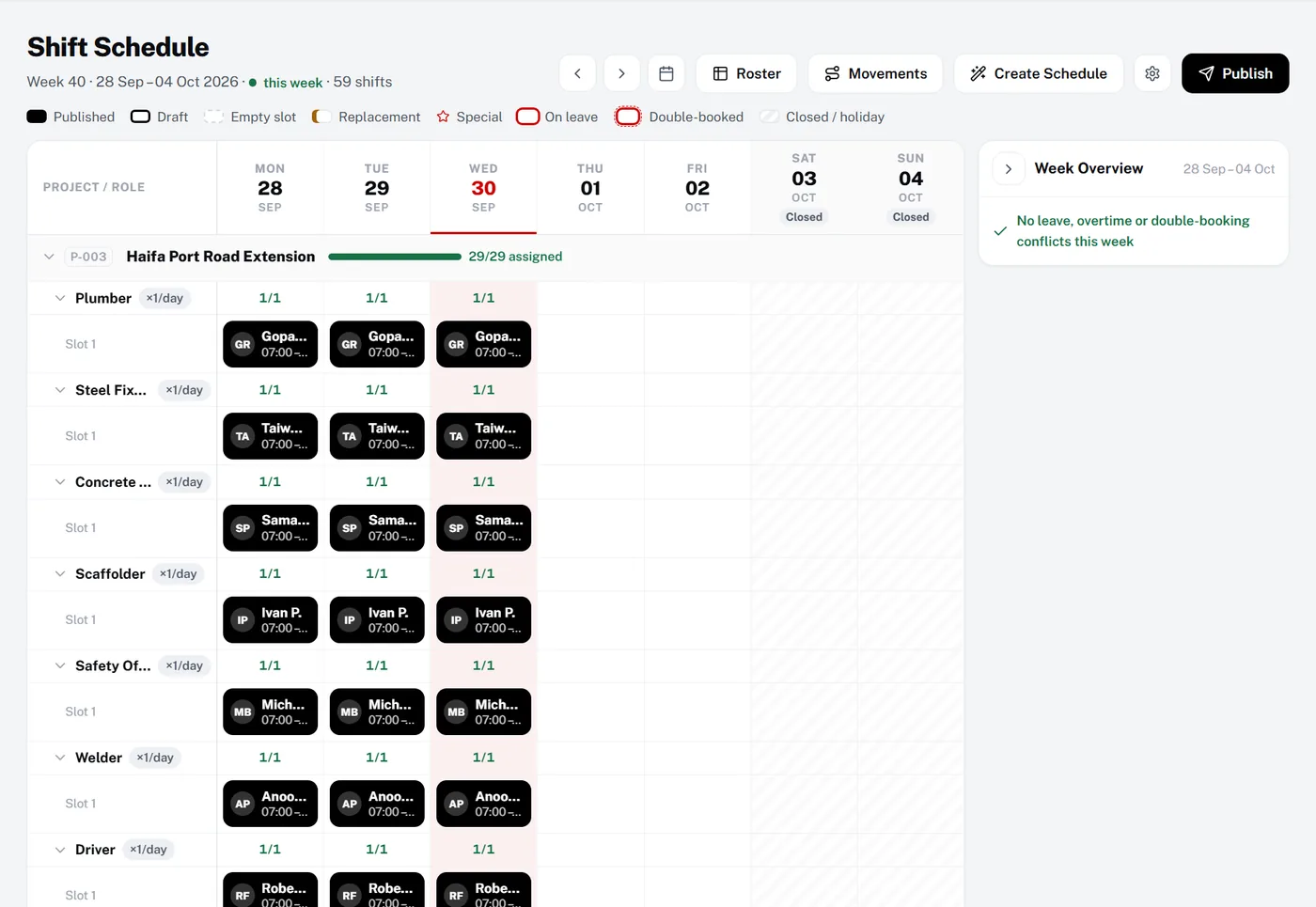
Quick verdict
Choose ClockShark if…
- You run a contracting or field service business that quotes and invoices customers.
- Job costing and QuickBooks or Sage 100 Contractor sync are your priority.
- You want a kiosk with facial recognition and native mobile apps.
- Your crews work in English or Spanish.
Choose Manpower OS if…
- You want payroll calculated in the system, not exported to another tool.
- You manage visas, permits and housing for the workers you employ or supply.
- You also recruit: job orders, a candidate pipeline and onboarding.
- You want a separate database per company or a self-hosted licence.
Feature by feature
ClockShark vs Manpower OS.
“Not listed” means we did not find it on ClockShark’s public website in October 2026, not that it does not exist. Numbers link to the sources below.
| Feature | ClockShark | Manpower OS |
|---|---|---|
| Shift scheduling | Yes Drag-and-drop and draft schedules1 | Yes Per project and role, conflicts flagged before publishing (Growth, Pro) |
| GPS time clock | Yes GPS tracking and geofencing2 | Yes GPS check-in against each site’s position, one check-in radius for the company (Growth, Pro) |
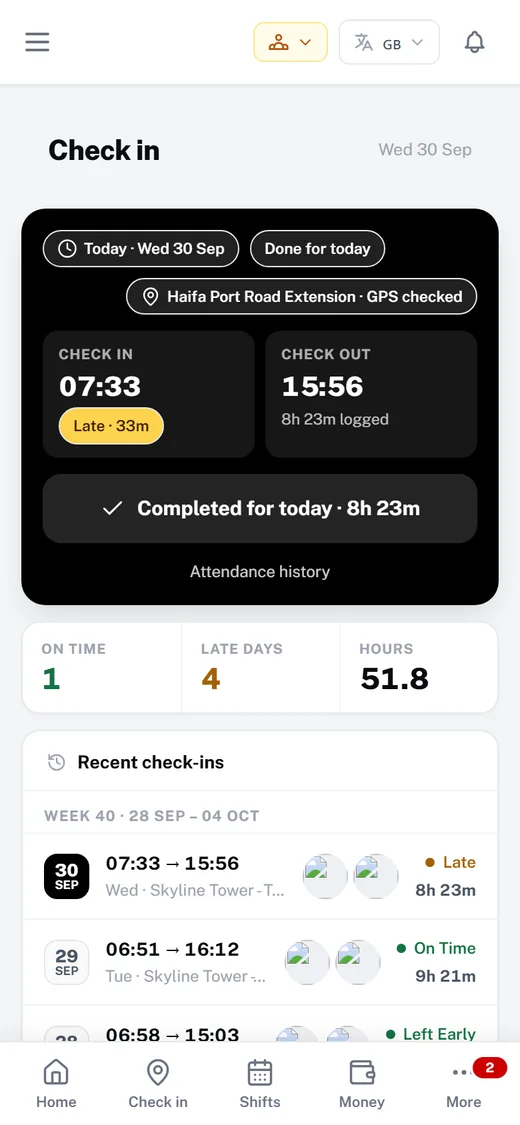
| Selfie / photo verification | Partial Facial recognition and photo capture on the ClockShark Kiosk4 | Yes Live selfie on check-in and check-out, stored privately |
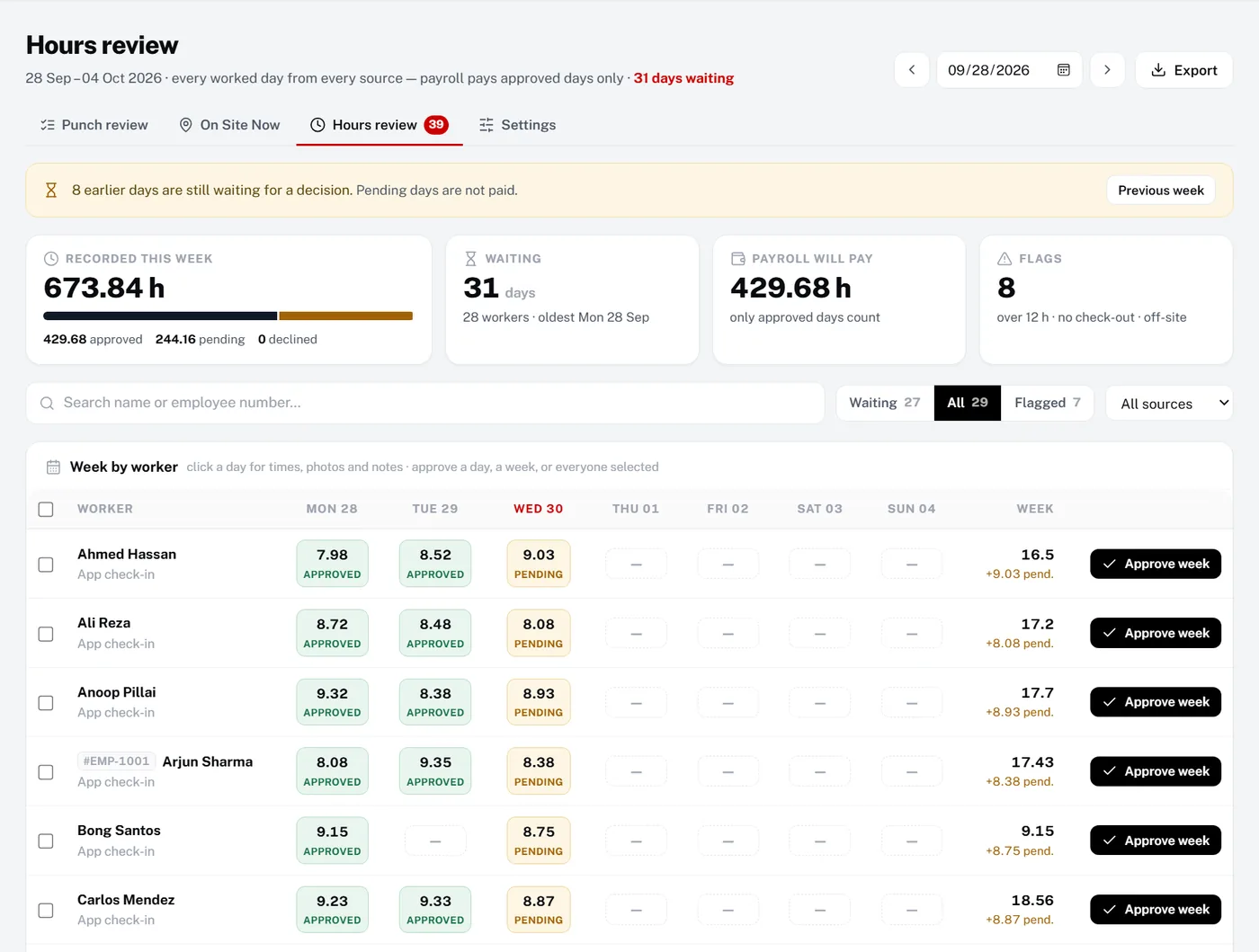
| Hours approval | Yes Manager roles and approvals1 | Yes Weekly hours review; only approved days are paid |
| Payroll | Partial Exports to payroll providers such as Gusto, ADP, Paychex and QuickBooks3 | Yes Built in: overtime tiers, payslips, CSV export (no UAE WPS file) |
| Salary advances | Not listed | Yes Requested in the app, recovered in the payroll run |
| Recruitment / job orders | Not listed | Yes Job orders, candidate pipeline, public application form |
| Documents & visa expiry | Not listed | Yes Passport, visa and permit expiry with reminders |
| Worker housing | Not listed | Yes Houses with capacity, free beds and house leaders (Growth, Pro) |
| Transport / fleet | Partial Mileage tracking (Pro)1 | Yes Vehicles and their documents, transport groups, bus cards (Growth, Pro) |
| Multi-language worker app | Partial Spanish language support1 | Yes Auto-translation into 7 languages incl. Arabic and Hebrew, right-to-left (Pro, self-hosted) |
| WhatsApp AI assistant | Not listed | Partial Self-hosted licence only, on your own WhatsApp Business number |
| Separate database per company | Not listed | Yes Every company has its own database |
| Self-hosted option | Not listed | Yes Self-hosted licence on your own server |
| Native app-store apps | Yes Google Play and Apple App Store2 | No Mobile web app added to the home screen; no app-store download |
| Integrations | Yes QuickBooks, ADP, Sage 100 Contractor, Xero, Gusto, Paychex, Zapier and more3 | Partial QuickBooks Online and Xero payroll journals; ADP, Paychex, Gusto and Sage 100 Contractor hours files; webhooks and Zapier (Growth, Pro); no integrations marketplace |
| Starting price | Priced per user on Standard and Pro (see their pricing page); 14-day trial with Pro features1 | Free for up to 10 workers; Growth and Pro on the pricing page; 30-day Pro trial, no card |
Manpower OS plans: Free up to 10 workers, Growth up to 30, Pro up to 150, plus a self-hosted licence. Plan names in brackets show where a module starts.
Honest trade-offs
Where each one is stronger.
Where ClockShark is stronger
- Job costingJob and task tracking on every plan, with advanced job costing controls on Pro, according to their pricing page as of October 2026.1
- Quotes and invoicesTheir help centre has a Quotes and Invoices section. Manpower OS does not invoice clients today.5
- More integrationsQuickBooks, ADP, Sage 100 Contractor, Xero, Gusto, Paychex, Paylocity, MYOB and Zapier are listed on their integrations page. Manpower OS covers QuickBooks Online, Xero, ADP, Paychex, Gusto, Sage 100 Contractor and Zapier, but not Paylocity or MYOB.3
- Kiosk and native appsA kiosk with facial recognition and photo capture, and apps on Google Play and the App Store. Manpower OS records a live selfie for review but does not match faces.4
Where Manpower OS is stronger
- Payroll, not only timesheetsOvertime tiers, rest-day and holiday multipliers, payslips and a payroll run you lock, export and mark paid. ClockShark’s integrations page lists exports to payroll providers.3
- Salary advancesWorkers request an advance in the app, the office approves it, and it is recovered automatically when the payroll run is finalised.
- Visas, documents and housingExpiry tracking with reminders, role-to-visa rules, houses with free beds, vehicles and bus cards, all on the worker record.
- Worker languagesAuto-translation into seven languages including Arabic and Hebrew with right-to-left layouts, on Pro and self-hosted.
Approve once, pay what was approved
Every worked day lands in one weekly grid. Days over 12 hours or without a check-out are flagged, and only approved days reach payroll.
Check-in at the gate
GPS position, a live selfie and the time on every punch, from the worker’s own phone.
Switching
Moving from ClockShark in 4 steps.
- 1Export your employees and hoursTake your employee list and a recent timesheet export from your current tool.
- 2Import into Manpower OSImport workers from an .xlsx or CSV file. Sites without phones can upload a timesheet spreadsheet into Hours review.
- 3Build the first scheduleAdd projects and roles, build the week on the shift board and publish it to the worker app.
- 4Close one payrollApprove the week, run payroll with your overtime rules and publish payslips to the workers.
FAQ
Questions, answered.
If your timesheets should end in payroll, and you also manage visas, housing or recruitment for your workers, yes. If job costing, customer quotes and invoices and accounting integrations matter most, ClockShark is built for that.
Not today. Manpower OS tracks staffing and hours per project but does not do cost-code job costing or invoice clients. Timesheets and payroll runs export as CSV for your accounting software.
Yes. The shift schedule shows every project and role for the week, flags leave, double-bookings and weekly-hour limits before you publish, and roster templates repeat crews. Workers see their shifts in the app. Scheduling is on Growth and Pro.
Yes, on Growth and Pro. Manpower OS runs payroll itself, posts each locked payroll run to QuickBooks Online or Xero as a balanced journal, and can hand approved hours to ADP, Paychex, Gusto or Sage 100 Contractor as their import file. ClockShark lists integrations with QuickBooks, Gusto, ADP and others as of October 2026.
No. The worker app runs in the phone browser on Android and iPhone and can be added to the home screen. There is no app-store download and no push notifications; reminders go out by email and in the app.
Yes. Every new workspace gets 30 days of the full Pro plan, without a card, and then you choose a plan or stay on Free. ClockShark’s pricing page lists a 14-day trial with Pro features as of October 2026.
Try it with your own workers.
Import your crew from a spreadsheet and run a real week. Full Pro free for 30 days, no card, then pick a plan or stay on Free.
Sources (checked 13 October 2026)
- ClockShark pricingmktg.clockshark.com/pricing
- ClockShark home pagemktg.clockshark.com
- ClockShark integrationsmktg.clockshark.com/integrations
- ClockShark help: kiosk facial recognitionhelp.clockshark.com/using-facial-recognition-and-photo-capture
- ClockShark help centrehelp.clockshark.com
ClockShark is a trademark of its owner. This comparison is based on public information as of October 2026; check their site for current details. Manpower OS is not affiliated with ClockShark. Spotted something out of date? Tell us and we will correct it.