

For site crews and the office
A GPS time clock app built for construction crews.
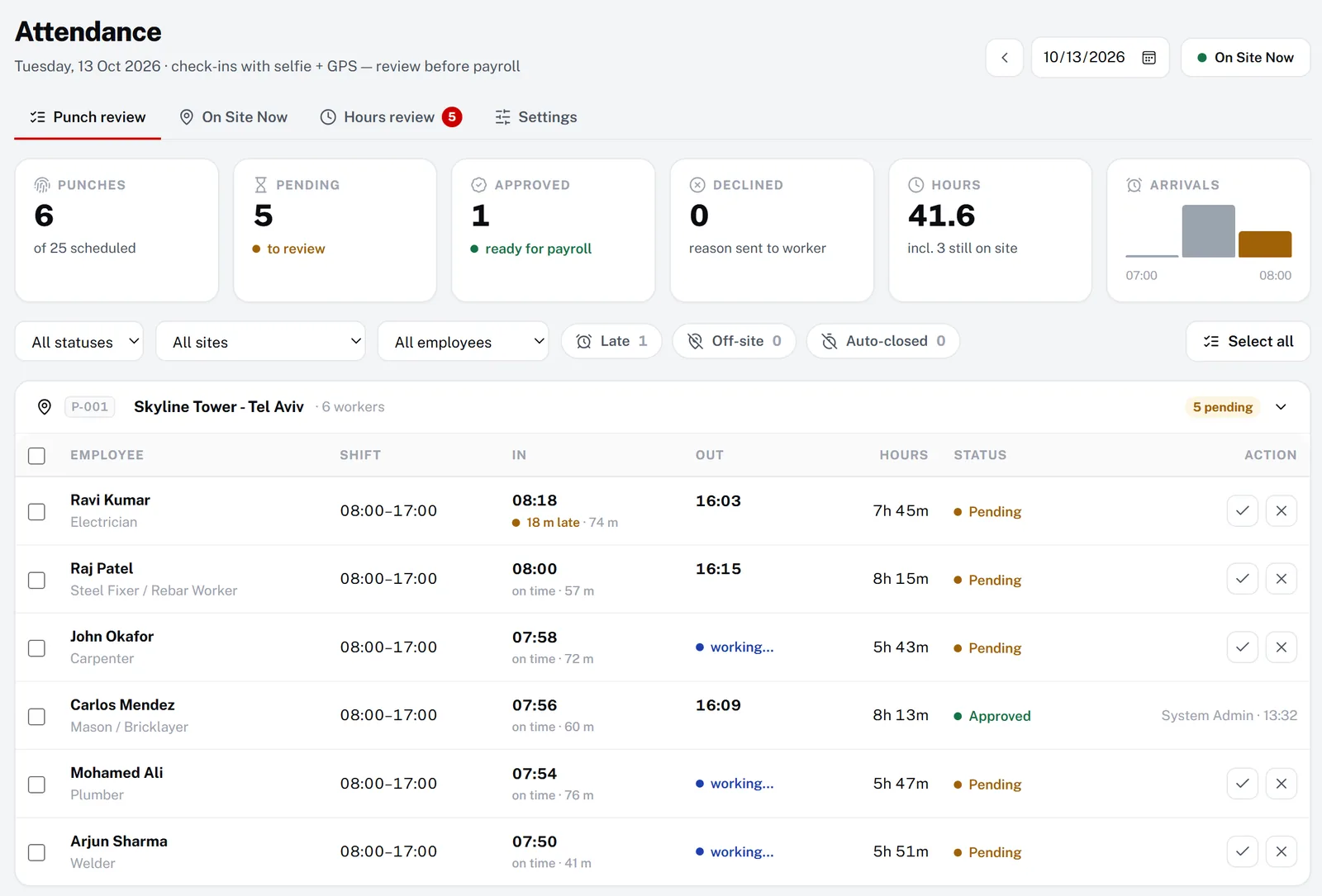
A GPS time clock app lets workers clock in and out on their own phone while it records where and when they did it. In Manpower OS, workers check in with GPS and a selfie at the site, the office sees who is on site live, and approved check-ins become the hours payroll pays.
- 30 days of full Pro, no card
- Never charged automatically
The problem
Paper sheets and phone calls do not prove who was on site.
-
Buddy punching
Someone signs in for a friend, and the sheet says eight hours whatever really happened.
-
Nobody knows who is on site
The foreman counts heads at 7:30 and phones around for the missing ones.
-
Clock-ins from the car park, or from home
A time clock without location cannot tell you whether the punch happened at the site.
-
Hours fixed after payday
Missing check-outs and 14-hour days are found when the worker complains about the payslip.
How Manpower OS solves it
Clock in at the gate. Approve once. Pay what was worked.
Location, identity and time on every punch, reviewed by the office before anything is paid.
Check-in from the worker’s phone
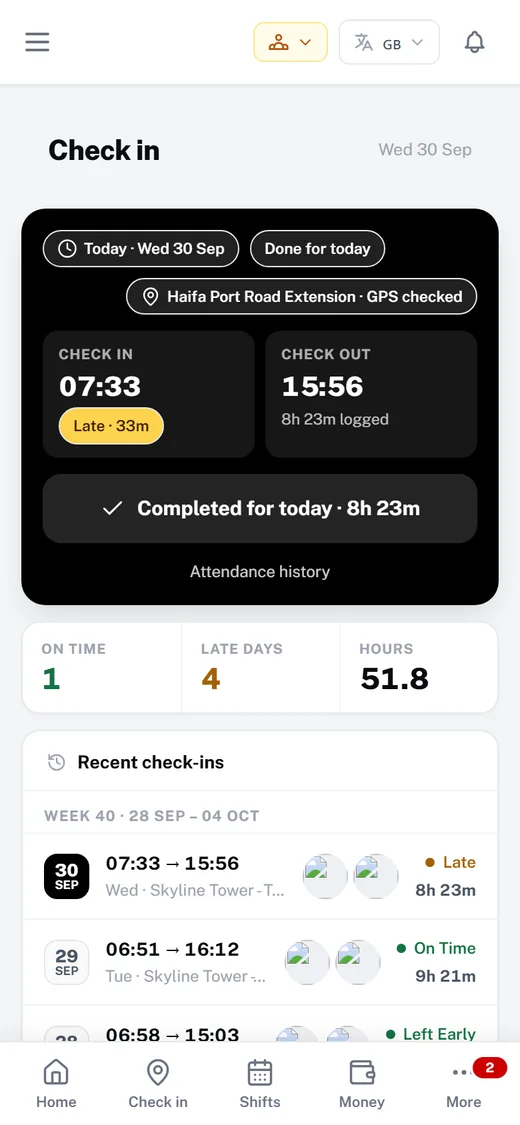
The worker opens the app at the site and checks in. It records the GPS position, a live selfie and the time, then shows the day’s check-in, check-out and hours logged.
- GPS position compared with the site location
- A selfie on check-in and check-out
- Runs in the phone browser; add it to the home screen
On Site Now, live
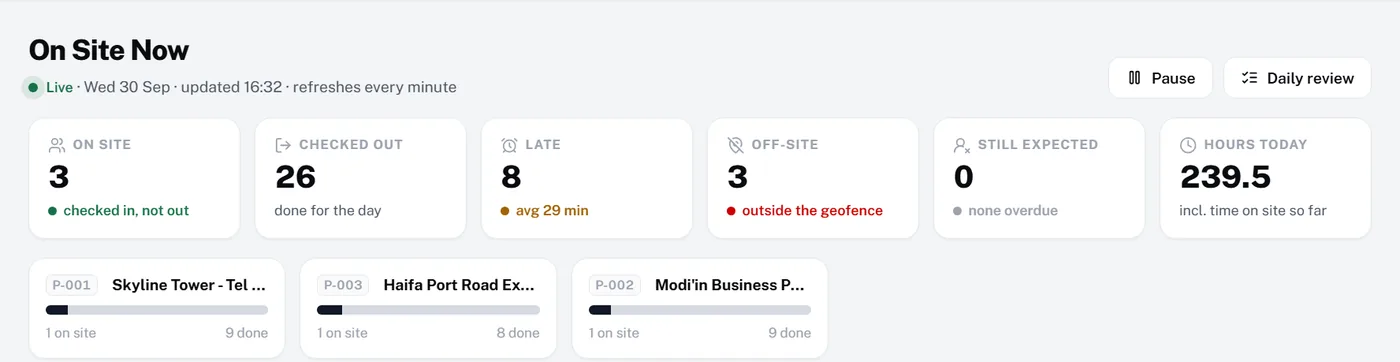
A live board of who is on site, checked out, late, off-site or still expected, per project. It refreshes every minute.
- On-site count per project
- Average delay for late arrivals
- Hours on site so far today
Also built in
Site radius check
Each project has its site position. Check-ins outside the radius you set are flagged as off-site, or blocked if you prefer.
Growth & ProPrivate selfies
Check-in photos are stored privately and shown only to the office, never on a public link.
Growth & ProFlags before payroll
Hours review flags days over 12 hours, missing check-outs, off-site punches and zero-hour days.
Growth & ProTied to the schedule
Punches are shown against the published shift, so late arrivals stand out on their own.
Growth & ProTimesheet upload option
Sites without phones can upload a timesheet spreadsheet instead, reviewed in the same place.
Growth & ProStraight into payroll
Approved hours feed payroll with your overtime rules, and payslips appear in the worker’s app.
Growth & ProBadges show the plans that include each module. The 30-day trial includes everything in Pro except the AI assistant.
How it works
Up and running in 4 steps.
- 1Create your workspaceTry GPS attendance free for 30 days on the full Pro plan, no card.
- 2Set the site locationsAdd each project’s address and position, choose the check-in radius and whether a selfie is required.
- 3Invite the crewWorkers sign in on their phone and add the app to their home screen.
- 4Review and approveApprove punches each day, or the whole week in Hours review. Payroll pays approved days only.
Compare
How it compares.
What a typical setup looks like, side by side. General descriptions, not any one vendor.
| Need | Spreadsheets & WhatsApp groups | Generic HR / time-clock apps | Manpower OS |
|---|---|---|---|
| Proof of location | None | Usually GPS | GPS against the site radius, flagged or blocked |
| Proof of identity | A signature | Sometimes a photo | A live selfie, stored privately |
| Live on-site view | A head count | Who clocked in | On Site Now: late, off-site, expected |
| Linked to the shift plan | No | Varies | Lateness from the published shift |
| Problem days flagged | Found on payday | Varies | Over 12 h, no check-out, off-site |
| Payroll | Retyped | Export to a payroll tool | Approved hours flow into payroll |
FAQ
Questions, answered.
An app workers use on their own phone to clock in and out. It records the time and the GPS position of each punch, so you know who worked, when and where. In Manpower OS the punch also carries a selfie and is checked against the site location.
They only count as on site inside the radius you set around the project. Check-ins outside it are flagged as off-site for review, or you can choose to block them.
No app store download is needed. The worker app runs in the phone’s browser on Android and iPhone and can be added to the home screen like an app.
It is built for construction: check-ins are tied to projects and published shifts, site leaders see their own crew, and approved hours go straight to payroll with overtime tiers.
GPS site attendance, shift scheduling and hours review are on the Growth and Pro plans. Every new workspace can try them free for 30 days on the full Pro plan, without a card.
The day is flagged in Hours review as missing a check-out. The office corrects the time before approving it, and only approved days reach payroll.
Try it with your own crew.
Create your workspace in under a minute. Full Pro free for 30 days, no card, then pick a plan or stay on Free.